
A Buyer’s Framework for Evaluating WYSIWYG Editors for SaaS Products
Rich text editing has quietly become one of the most load-bearing components in modern SaaS applications. Whether users are writing support articles, authoring proposals, or collaborating on documents, they expect a seamless, polished editing experience, not a bare textarea or a cryptic code box.
The demand is real and growing. As SaaS products expand their content workflows, the pressure to embed a capable, performant editor grows alongside them. But choosing the wrong one has real consequences: bloated bundle sizes that slow your app, security gaps that expose users to XSS attacks, integration nightmares that eat engineering sprints, and an editing experience clunky enough to drive users away.
The market for wysiwyg editors is more crowded than it looks. Dozens of options exist across the open-source and commercial spectrum, each with a different profile of strengths, tradeoffs, and long-term costs. Without a structured evaluation process, most teams default to gut feel or the first library a developer already knows. That approach works until it doesn’t.
This framework gives product and engineering teams a systematic way to evaluate WYSIWYG editors: what to assess, what questions to ask, which mistakes to avoid, and how to match an editor’s capabilities to the specific demands of a SaaS product at scale.
Key Takeaways
- WYSIWYG editors are now core infrastructure in SaaS: choosing poorly affects UX, performance, and developer velocity.
- Evaluate across six dimensions: integration, UX, performance, security, features, and scalability.
- Common mistakes include prioritising feature breadth over rendering speed and skipping security due diligence.
- Modern editors reduce engineering overhead and accelerate release cycles when chosen correctly.
- A structured buyer’s framework, not gut feel, leads to better, more durable decisions.
What Are WYSIWYG Editors?
Before diving into evaluation criteria, it helps to be precise about what WYSIWYG editors actually are and where they genuinely earn their place in a SaaS stack.
Understanding WYSIWYG Editing
WYSIWYG stands for What You See Is What You Get, a phrase that captures the core promise: users interact with content that looks exactly as it will when rendered, rather than working in a markup or code view.
In practice, a WYSIWYG editor presents a visual, formatted interface: styled text, embedded images, and formatted tables, while generating structured HTML (or another output format) behind the scenes. Users click bold; the text turns bold. They hit enter after a heading; a paragraph begins. No knowledge of HTML or CSS required.
Compare that to plain text editing, where formatting is absent entirely, or to manual HTML editing, where a writer would need to type <strong> tags around text they want bolded. WYSIWYG editors sit firmly between those two extremes: they give users the visual feedback of a word processor with the structured output a web application needs.
For SaaS teams, that distinction matters. The editor is rarely seen as a standalone product; it’s embedded inside something larger. And the quality of that embedding affects everything from first impressions to retention.
Common SaaS Use Cases
WYSIWYG editors surface across more SaaS categories than most buyers initially expect:
- Content management systems are the obvious home: blog authoring, landing page builders, and product content tools all depend on rich text editing as core functionality. The editor is the product, effectively.
- Collaboration and productivity platforms use embedded editors for documents, wikis, shared notes, and real-time co-authoring. Here, performance and concurrent editing behaviour matter as much as formatting capability.
- Customer support and documentation tools rely on editors to help non-technical writers produce clean, well-structured articles: knowledge bases, FAQs, onboarding guides, and changelogs all run through an embedded editing experience.
Your use case determines your requirements. Your requirements determine how you evaluate tools. Here’s a simple framework to follow.
Key Factors to Evaluate in WYSIWYG Editors
There’s no universal “best” WYSIWYG editor, only the best fit for a specific product context. Structured evaluation across these four dimensions produces far better outcomes than feature-list comparisons alone.
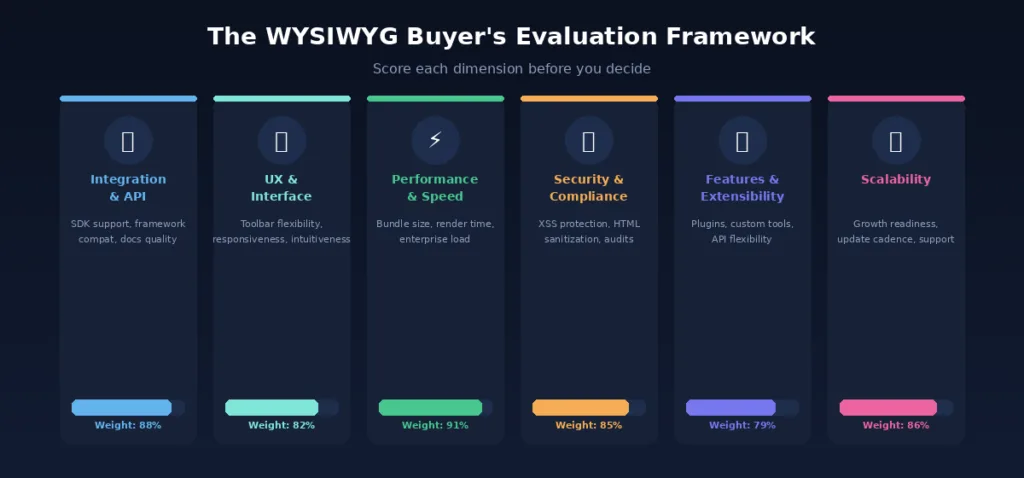
Ease of Integration
An editor that looks great in a demo but takes three weeks to integrate properly is not a good editor for your team; it’s a liability disguised as a solution.
SDK and API availability are the first filter. Does the editor ship first-class SDKs for the frameworks your team uses? React, Vue, and Angular support should be table stakes for any modern SaaS stack. If you’re working with a newer or less common framework, verify explicitly rather than assuming.
Framework compatibility goes beyond official SDK support. How does the editor behave inside component lifecycles? Does it play well with state management patterns? Are there known conflicts with popular libraries? These questions rarely surface in documentation; they show up during integration.
Developer-friendly documentation is often underweighted in evaluations and almost always regretted when it’s poor. Look for working code samples, not just API references. Check community forums and GitHub issues for the kinds of problems teams actually run into. An editor with excellent documentation cuts integration time significantly and reduces reliance on vendor support for routine questions.
A useful rule: before shortlisting any editor, have a developer prototype a realistic integration, not a “Hello World” demo, in the actual application environment. Timebox it to half a day. The results are almost always more revealing than any comparison article.
User Experience and Interface
The editor’s end users are usually not the people evaluating it. That gap creates risk, technical buyers optimise for APIs and features while their users struggle with an interface that’s confusing or frustrating.
Intuitive editing experience is harder to quantify than most evaluation criteria, but it’s not unquantifiable. Put the editor in front of five representative users with no instructions. What do they figure out quickly? What do they ask about? What do they give up on? That 30-minute session will surface UX issues that no documentation will mention.
Toolbar customisation is critical for embedded SaaS contexts. Your users probably don’t need every formatting option available, and showing them a toolbar full of controls they’ll never use creates cognitive load that degrades the editing experience. The best editors allow precise control over which tools appear, in what order, and under what conditions.
Responsive editing capabilities matter increasingly as SaaS users shift between desktop and mobile. An editor that renders beautifully on a 27-inch monitor but becomes unusable on a phone is already behind. Verify responsive behaviour explicitly, including touch interactions and virtual keyboard handling.
Performance and Scalability
Performance is the evaluation dimension most likely to be assessed too late, usually after a slow editor has already made it into production.
Fast loading and rendering start with bundle size. An editor’s JavaScript payload adds directly to your application’s initial load time. For context, a 500 KB uncompressed editor script on a slow mobile connection can add multiple seconds to your app’s time-to-interactive, a threshold that measurably affects user retention. Demand gzipped bundle size numbers, not marketing copy.
Lightweight architecture also affects runtime behaviour. Editors built on lean, framework-agnostic cores tend to cause fewer conflicts, consume less memory, and behave more predictably inside complex SaaS applications than monolithic editors that assume full-page ownership.
Scalability for enterprise applications shifts the question from “how does it perform for one user?” to “how does it perform for ten thousand simultaneous users generating content?” Enterprise readiness includes support for large documents, graceful handling of concurrent edits, and consistent behaviour under load, not just a pleasant demo experience.
Security and Compliance
Security is non-negotiable in any SaaS product that accepts user-generated content, and WYSIWYG editors are a primary vector for injection attacks if not handled carefully.
HTML sanitisation should happen automatically within the editor, not as a separate step your team bolts on afterwards. An editor that outputs raw, unsanitized HTML and leaves cleanup to the developer is passing risk downstream. Verify that sanitisation is built into the output pipeline, not an optional configuration.
XSS (Cross-Site Scripting) protection is the most critical specific concern. Any editor that allows users to paste or input arbitrary HTML is a potential XSS surface. Test this directly: paste a script tag into the editor and see what the output HTML looks like. The answer should never be an unescaped <script> tag.
Secure content handling extends to how the editor manages embedded media, linked URLs, and copy-pasted content from external sources. Each of these represents a potential entry point for malicious content. Editors with mature security postures handle all three defensively by default.
Here’s a practical checklist across the four critical evaluation dimensions; use this as a gate before any editor makes the shortlist.
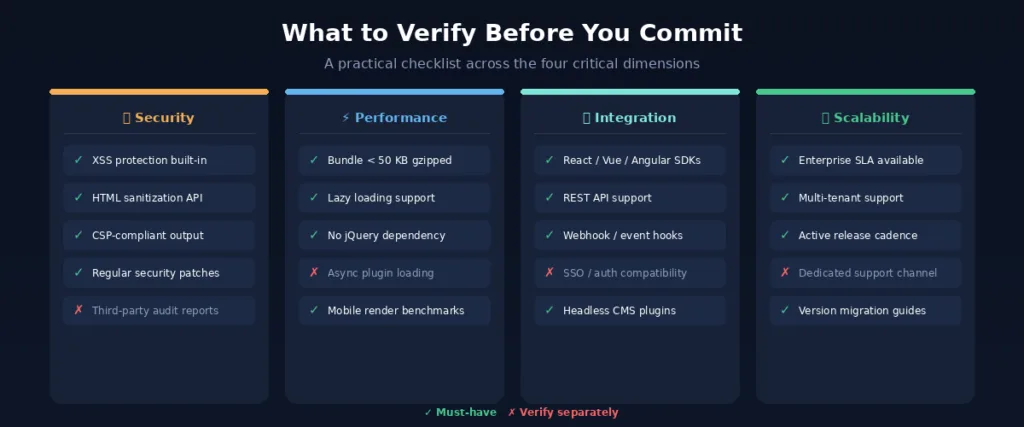
Beyond the four core evaluation dimensions, certain feature categories warrant specific attention depending on the SaaS context.
Essential Features Buyers Should Prioritise
Not every feature on an editor’s marketing page matters equally for every product. But three categories consistently drive purchasing decisions for SaaS teams.
Rich Text Formatting
The baseline. Every WYSIWYG editor supports text styling: bold, italic, underline, headings, but the quality of that support varies considerably.
Text styling and media embedding should feel seamless. Images should be droppable and resizable inline. Videos should embed without requiring raw HTML. File attachments should behave predictably.
Tables, lists, and links are deceptively tricky in rich text editors. Tables in particular have a long history of implementation bugs, especially around resizing, merging cells, and pasting from spreadsheets. If your users will work with tables regularly, test them rigorously, don’t assume they work.
Advanced formatting tools: code blocks, block quotes, custom styles, format painters, matter more in documentation and knowledge base contexts than in simple blog authoring tools. Prioritise based on your actual use case.
Collaboration Features
As SaaS products mature, collaboration requirements tend to expand. An editor that supports individual authoring may not support collaborative workflows gracefully.
Real-time editing support, where multiple users edit the same document simultaneously, is architecturally complex and not universally available. If concurrent editing is a product requirement now or in the near future, this becomes a hard filter rather than a nice-to-have.
Workflow and permissions capabilities: draft states, review modes, role-based editing access, support for structured content operations. These matter most in CMS and documentation contexts where multiple stakeholders touch content before it publishes.
Shared editing experiences encompass commenting, suggestion mode, and change tracking. These are table-stakes features in document collaboration tools; they’re less relevant in single-author content editors. Map the requirement to the actual product context.
Customisation and Extensibility
SaaS products evolve. An editor’s long-term suitability depends heavily on how much it can grow and adapt alongside your product.
Plugin ecosystems reduce the engineering cost of extending editor functionality. An active plugin ecosystem signals a healthy developer community and reduces the likelihood that your team will need to build custom extensions from scratch.
Custom toolbar options go beyond cosmetic preferences. The ability to add proprietary tools, custom insertion buttons, brand-specific formatting options, and product-specific shortcuts determines whether the editor can serve as a true product surface rather than a generic third-party widget embedded in your UI.
API flexibility at the programmatic level enables the most powerful integrations: auto-saving to custom backends, content transformation pipelines, programmatic content injection, integration with AI writing tools. Assess not just what the API supports today, but how actively it’s documented and extended.
Knowing what to look for is only half the framework. Knowing what to avoid is equally important.
Common Mistakes When Choosing a WYSIWYG Editor
Most WYSIWYG editor decisions that go wrong don’t fail because the product lied; they fail because the buyer evaluated the wrong things.
There are four common mistakes that often lead to choosing the wrong tool. Most can be avoided with a clear evaluation process.
Prioritising Features Over Performance
The most common mistake. Feature-rich editors are easy to demo and easy to sell; they support every formatting option imaginable, ship with dozens of plugins, and look impressive in a quick walkthrough.
What demos don’t show is the performance cost. An editor that ships a 1 MB JavaScript bundle, initialises slowly, and renders sluggishly at scale is actively harming user experience, regardless of how many toolbar buttons it supports.
Overloaded editors slow applications in ways that compound over time. Initial load times increase. Mobile users suffer more than desktop users. Users in low-bandwidth environments, which is a significant portion of a global SaaS user base, may experience meaningful degradation.
Unnecessary complexity also creates support and maintenance overhead. Every feature that isn’t used is still a feature that needs to be patched, documented, and reasoned about.
The discipline here is to evaluate against your product’s actual feature requirements, not against a theoretical maximum. An editor that does 80% of what you need while loading 10x faster than the feature-complete alternative is often the right call.
Ignoring Long-Term Scalability
Many WYSIWYG editor evaluations happen at a product’s early stage, when user counts are low and content volumes are modest. The editor that performs fine at launch may buckle significantly as the product grows.
Future growth considerations should include not just user volume but content complexity. Large documents, deeply nested formatting, and high-frequency autosave operations all stress editor architectures differently than simple short-form content.
Maintenance and updates matter more than buyers typically anticipate at evaluation time. An editor that shipped a strong version two years ago but has received minimal updates since is already accumulating technical debt. Check release history, not just current feature parity.
Enterprise readiness encompasses SLAs, dedicated support channels, migration guides between major versions, and a vendor’s ability to respond to security vulnerabilities quickly. These factors are invisible in a feature comparison but become critical once the editor is embedded in a production application serving real users.
With the mistakes in view, it’s worth stepping back to consider why modern editors have become the default choice for SaaS teams that have done this evaluation carefully.
Why SaaS Teams Choose Modern WYSIWYG Editors
The market has matured considerably in recent years. Modern WYSIWYG editors aren’t the bloated, jQuery-dependent tools of a decade ago; the best ones are lightweight, secure, extensible, and designed explicitly for embedded SaaS contexts.
Faster Product Development
One of the clearest ROI arguments for a well-chosen WYSIWYG editor is the engineering time it saves.
Reduced engineering workload is the most direct benefit. Building a capable rich text editor from scratch is a multi-month undertaking even for experienced teams, and maintaining it indefinitely compounds that cost. Adopting a mature editor library eliminates that workload almost entirely.
Faster implementation means the feature ships sooner. A well-documented editor with strong SDK support can go from evaluation to production integration in days rather than weeks. That velocity compounds across the product roadmap.
Improved release cycles follow from the reduction in editor-related engineering overhead. When the editor handles formatting, output generation, and security sanitisation reliably, developers focus on product-specific differentiation rather than infrastructure maintenance.
Better End-User Experience
The downstream beneficiary of a well-chosen editor is the user. And user experience in content tools has a direct line to retention.
Easy content creation reduces friction at exactly the moment when users are most engaged, when they’re creating something. An editor that feels natural and responsive reinforces the product’s value; one that feels clunky or unreliable creates doubt.
Improved usability correlates with time-on-task and feature adoption. Users who find the editor intuitive use it more, explore more features, and generate more content, all of which deepen their engagement with the broader product.
Consistent editing across devices has become a baseline expectation. Users switch between desktop and mobile with no tolerance for a degraded experience on either. Editors who treat mobile as an afterthought create real product quality issues that surface in support tickets and churn data.
Building a Smarter Evaluation Process
Choosing a WYSIWYG editor is a product infrastructure decision, one that compounds in either direction over time. A well-chosen editor accelerates development, improves user experience, and stays out of the way as the product scales. A poorly chosen one creates a slow accumulation of UX debt, performance issues, and engineering distraction.
The framework outlined here isn’t complicated, but it requires discipline. Evaluate integration quality before you’re charmed by features. Test performance under realistic load before you test formatting options. Check security posture before you check plugin counts. And think about where your product will be in three years, not just where it is today.
The market for wysiwyg editors has matured significantly; teams no longer need to choose between “powerful but heavy” and “lightweight but limited.” Modern editors like Froala have closed that gap, offering lightweight architecture, clean HTML output, strong security defaults, and deep customisation, all in a package designed for embedded SaaS use cases.
Whatever editor you ultimately select, a structured evaluation process is what separates a decision you’ll defend comfortably in a year from one you’ll be quietly working around.
Before shortlisting WYSIWYG editors for your SaaS product, use Froala Online HTML Editor to test the editing experience, preview HTML output, and see how visual content creation feels in practice.
Frequently Asked Questions
What are WYSIWYG editors?
A WYSIWYG editor is a content creation interface that displays formatted text, images, and media exactly as they will appear when published, without requiring the user to write HTML or CSS. The editor generates structured markup behind the scenes while the user works in a visual, word-processor-style environment. In SaaS products, WYSIWYG editors are embedded components that power content creation features across CMS tools, documentation platforms, collaboration apps, and more.
Why are WYSIWYG editors important for SaaS products?
WYSIWYG editors serve two primary functions in SaaS products. First, they improve the end-user experience by making content creation accessible to non-technical users without the knowledge of coding. Second, they simplify content creation workflows at the product level, enabling teams to ship a capable, fully featured editing experience without building it from scratch. When chosen well, they reduce engineering overhead, improve content quality, and deepen user engagement with the product.
What should buyers look for in a WYSIWYG editor?
The most durable buying decisions weigh six dimensions: integration ease (SDK quality, framework support, documentation), user experience (intuitive interface, toolbar flexibility, mobile behavior), performance (bundle size, rendering speed, memory footprint), security (HTML sanitization, XSS protection, secure content handling), features (formatting depth, collaboration support, extensibility), and scalability (enterprise readiness, update cadence, long-term support). Buyers who evaluate all six, rather than comparing feature lists alone, consistently make better decisions and encounter fewer post-deployment surprises.