
How to effectively warm up Facebook accounts for seeding to triple reach?
Seeding is key to tripling your reach , but poor asset hygiene and suspicious login patterns can destroy your budget and lead to account locks . This ultimate guide provides the full playbook for managing multiple facebook accounts safely using technical safeguards like the Hidemyacc antidetect browser and high-quality residential/mobile proxies . Follow our structured 3-phase seeding strategy below to build account trust and scale your campaigns effectively.
Can seeding really triple your reach?
I’ve seen it, when seeding is done the right way, reach can jump dramatically; a 3x uplift is not a fantasy, it’s a number I’ve heard repeatedly from marketers who coordinate timing, creative, and distribution. That said, the difference between a campaign that scales and one that gets shut down usually comes down to how you treat the accounts doing the seeding.
In my experience the biggest cause of wasted budget is not creative or targeting, it’s poor asset hygiene. Teams buy large batches of Facebook accounts for seeding because it promises fast distribution, but without a legitimate onboarding and maintenance process many of those accounts end up disabled. When accounts are treated like disposable tools (no proper setup, no clear ownership, reused contact info, suspicious login patterns), enforcement systems pick up signals and remove access which destroys reach, wastes ad spend, and often costs more to recover than the initial investment.
What unusual login signals usually trigger account locks?
From talking with other media buyers and troubleshooting disabled assets, the red flags are all about correlation and abnormal patterns. Facebook’s systems look for signals that suggest multiple accounts are operated from the same environment or are being coordinated inauthentically. Common problematic signals I’ve seen include:
- Multiple accounts appearing to share the same device fingerprint or browser session (e.g., many logins from one browser/profile without proper separation).
- Many accounts log in from a single IP range or from unstable/low-quality VPNs and proxies that cause inconsistent geolocation signals.
Sudden cross-region or rapid location changes that don’t match the account’s normal behavior. - Opening or managing many accounts from one physical device without proper isolation of sessions.
These signals don’t necessarily mean malicious intent, they just look suspicious. My takeaway: systems that create noisy, correlated login metadata are how accounts become linked in Facebook’s view, and once linked, enforcement on one asset can cascade to the rest.
What behaviors are commonly detected as “spam” or “unnatural”?
In the community I watch, “unnatural” often means the pattern, not the content. The behaviors that tend to trigger flags are the ones that resemble automated or mass distribution rather than organic engagement:
- Sending large volumes of friend requests or group invites in short windows.
- Posting the same comment or message across many groups/pages repeatedly.
- Sharing identical promotional links across many places, especially if those links are shortened or redirected through trackers.
- Commenting or sharing content in a way that looks like bulk promotion (lots of posts with the same wording, links, or CTAs).
What stood out to me is that platforms are increasingly tuned to detect distribution patterns rather than single posts. If your seeding approach creates repetitive, broadcast-like footprints, it will be treated as spammy and that’s what gets accounts disabled.
How does duplicate or conflicting identity information cause problems?
This one is simple but costly. Reusing identifiers across many accounts creates obvious correlation signals:
- Same phone number or SMS verification used for multiple profiles.
- One email address pattern or the same recovery contact reused across dozens of accounts.
- Identical or highly similar profile information (names, birth dates) across accounts.
When Facebook can easily connect accounts by shared contact or identity data, those accounts are grouped together in the platform’s model. If one account in that group exhibits risky behavior or gets flagged, the entire linked cluster becomes suspect. From my conversations with teams, the lesson is clear: identity reuse multiplies your exposure and turns localized problems into account-wide disasters.
How does being linked to suspicious assets increase risk?
Connections matter; pages, ad accounts, domains, or payment methods that carry negative history will drag attached profiles down. I’ve seen healthy-looking accounts get hit because they were tied to:
- An ad account previously disabled for policy violations.
- A Page or domain that had been reported for scams, phishing, or repeated policy infractions.
- Reused billing or payment methods associated with banned assets.
- Frequently shared links that users have reported as phishing or scammy.
In practice, even a single problematic asset in an ecosystem can reduce overall trust. That means when you plan seeding, you need to think about the whole asset graph, not just the individual profile posting the content.
How to warm up multiple Facebook accounts for seeding?
I always start by treating seeding like any serious marketing operation: document the goals, map the assets that will publish or amplify content, and confirm every action will follow platform policies. That planning step prevents a lot of avoidable risk, you want to know which Pages, business accounts, or people will share the content, which ad accounts (if any) will support it, and what measurement you’ll use to judge success. Planning first keeps everything auditable and defensible
Tools & Technical preparation
To ensure smooth operation, avoid account lockout and maintain stability, it is necessary to fully prepare the following 3 core components: Antidetect browser, high-quality proxy, and account cookies.
Antidetect Browser
Tool used: Hidemyacc.
Hidemyacc helps create independent virtual browser environments (profiles), each profile has a separate browser “fingerprint” (such as operating system, screen resolution, time zone, etc.). This tricks platforms like Facebook into believing that each account is being used by a different user on a different computer, thereby minimizing the risk of being detected and blocked in bulk. A little secret: I used HMANEWUSER to get a 10% discount. When I bought the annual package, I already got a 50% discount, and with this code, it was a total of 60% off.
Proxy
Preferred proxy type: Residential proxy or Mobile proxy.
Reason:
- These types of Proxies use real IP addresses assigned by Internet Service Providers (ISPs) or mobile carriers.
- They are highly reliable and are considered by major platforms like Facebook as real users’ IP addresses, providing maximum account protection.
Proxy type to avoid: Datacenter proxy.
- Reason: Datacenter Proxy IP addresses are often identified as virtual servers, have low reliability, are easily detected, and are the leading cause of accounts being locked or checkpointed immediately.
- Source: There are many reputable providers on the market. You can search for keywords like “buy residential proxy” or “buy mobile proxy” on Google to find and evaluate providers.
Account cookies
- Role: Cookies are data files containing account login session information, helping the browser confirm identity without having to re-enter the password.
- Required components: When purchasing a Facebook account, the supplier is required to provide a Cookies file or Cookies string (usually starting with c_user=…).
- How to use: You will need to Import (import) this Cookies string or file into the corresponding profile in the Hidemyacc browser to log in to the account without having to enter a password, helping to protect the account and increase trust from the first login.
Notes when buying Facebook account
Information received: Depending on the type of account you buy (Via, Clone, Old etc.), the supplier will usually provide the following information:
- Uid/Password (Username/Password).
- Cookies (Required).
- 2FA code (2-factor authentication code) or 2FA Key to get the code yourself.
- Recovery mail and mail password (if the account has a mail link).
Check and policy:
- Check activity: Always check if the newly purchased account is still active, locked or has any limited features.
- Support policy: Ask clearly about the supplier’s return or warranty policy in case the account is faulty or locked immediately after purchase.
How to create profiles on Hidemyacc to log in to each Facebook account?
This section will guide you in detail on how to use Hidemyacc to create separate virtual browser environments (profiles), helping you manage multi-login Facebook accounts safely and systematically.
First, choose the package: if you plan to manage a few dozen accounts (profiles), Hidemyacc’s base package is the most suitable and cost-effective choice.
Initial operation: after downloading the application and completing the registration/login to your Hidemyacc account, you can start the profile creation process.
Get started: click on the “new profile” button (or equivalent) on the Hidemyacc interface.
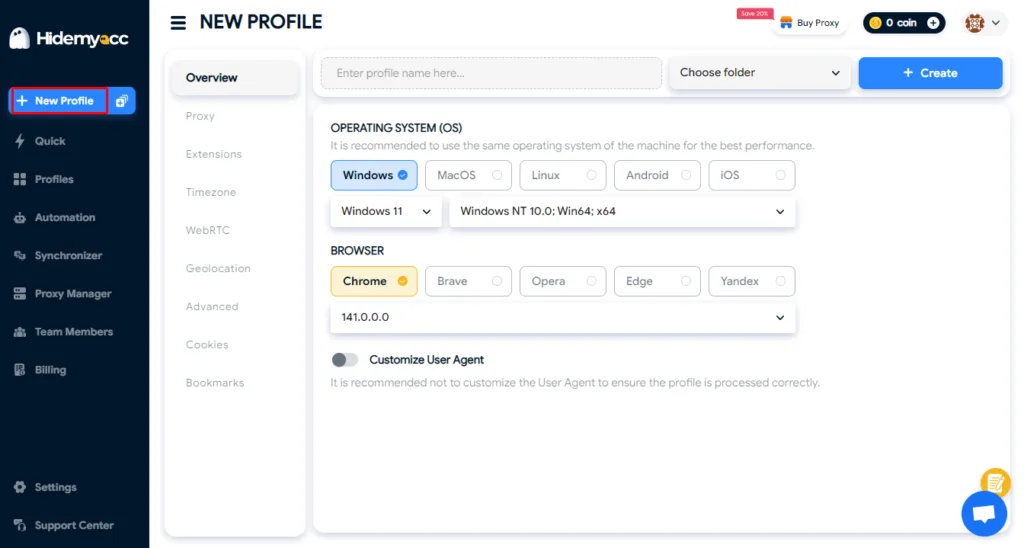
Name the profile: name the profile corresponding to the uid of the facebook account it will contain. For example: if the account uid is 100085432101234, you can name the profile fb_100085432101234. This makes it easier for you to track and manage when working with multiple accounts.
Set up basic configuration (browser fingerprint)
- Advice: you should choose the operating system (os) and browser (browser) similar to the computer system configuration you are using to achieve the best reliability.
- You don’t need to worry too much about other complicated parameters. Hidemyacc will automatically set the default parameters corresponding and suitable for your device, saving you time.
Go to proxy section
Select the option “your proxy” (use your own proxy).
Enter proxy: insert the residential or mobile proxy address that you have prepared into the input box in the standard format IP:PORT:USERNAME:PASSWORD
For accounts logged in with cookies, using extensions, you can attach them in this step.
- Copy URL of the extension on Chrome
- On Hidemyacc, select Add extension -> Chrome store URL
- Paste the extension’s url and upload
Done: Click “create” to save and create the profile
How to create multiple profiles on Hidemyacc?
To save time when you need to create dozens or hundreds of profiles:
Click on the “multiple account” icon (located right next to the “new profile” button).
Set the quantity:
- Enter the number of profiles you want to create this time.
- Enter profile name. In the profile name input field, you enter a list of profile names (should use fb uid) according to the rule: each name one line.
- Enter proxy in bulk:
- Similarly, in the proxy section, you enter the prepared proxy list in the format ip:port:username:password according to the rule: each proxy one line.
- Important: make sure the number of proxy lines must match the number of profile name lines and the number of profiles you want to create.
Complete: click “create” to let Hidemyacc automatically create a series of profiles with corresponding proxy attached.
Start slowly, log in to each account
After creating and setting up separate profiles with proxy in Hidemyacc, the next step is to log in to facebook accounts. To ensure security and increase trust for the account, you should do this slowly, one profile at a time. You have two main methods to log in to the created profiles:
Log in with traditional uid/password
Implementation: open Hidemyacc profile, access facebook, and directly enter the uid (or email/phone number) and password provided.
Verification processing: this method can easily lead to the account being requested for security verification.
If the account requires a two-factor authentication code (2fa): use the 2fa key provided by the provider to get the code and enter it.
If the account requires a recovery email code: use the email information and email password to log in, get the verification code and enter it into Facebook.
Log in with cookies (preferred method)
Log in with cookies to help Facebook recognize that you are continuing an existing session, minimizing the risk of being checked.
As I instructed in the above section, during the process of creating a profile (or editing an existing profile), Hidemyacc has a section that allows you to directly attach cookies to that profile.
You just need to copy the cookie string (starting with c_user=…) and paste it into the cookies box in the profile settings. After importing, open the new profile, the account will automatically log in.
Warm up accounts, building account trust
After successful and safe login, the next step is to build a natural activity history to increase the trust of the facebook accounts. This process needs to be executed slowly and patiently, mimicking real user behavior.
1. Week one: establishing basic user history
During the first 7 days after successful login, focus on light and spaced-out interactions:
- Core activities: engage in activities such as commenting, reacting (liking/loving), and sharing posts from friends or popular pages.
- Frequency: actions must not be too frequent and should be spaced out (e.g., each profile interacts 3-5 times a day at different hours) to resemble the behavior of a genuine user.
- Boosting personal trust: it is highly recommended to post content on the account’s personal wall (such as status updates or casual photos) to build user history and increase overall trust.
- Change the password: The seller noted that you can change your password after 3 days of logging in, but you can wait a week to change it.
For newly acquired accounts or those lacking complete information, you need to update the profile picture and cover photo:
- Timing: after 3 days of successful login (to avoid suspicious bulk actions immediately after login).
- Profile picture (avatar): use high-quality images that comply with facebook’s policies. An excellent resource is thispersondoesnotexist.com to obtain ai-generated face images, ensuring the photo is unique and not easily flagged for duplication.
- Cover photo: use neutral images like landscapes or general interests. unsplash.com is a great source for free, high-quality stock photos.
2. Week two: intensifying interaction and expansion
Starting from the second week, you can slightly increase the frequency and expand the range of activities to make the account look more active:
- Increase frequency: slightly increase the number of interactions (likes, comments) compared to the first week.
- Community engagement: join diverse facebook groups that are not directly related to your advertising goals (e.g., groups about cooking, travel, general news).
- Network building: consider creating small messenger groups between your accounts to simulate social interaction.
- Preparation for ads: create a page now if your ultimate goal is to run ads, giving the page time to “mature” before being used.
3. Activity maintenance and automation
Continue to maintain regular interaction, commenting, and posting activities for all accounts.
Using automation: to save time and ensure consistency, you can utilize the automation features within Hidemyacc.
- Ready-made scripts: use hidemyacc’s pre-built scripts to automatically perform actions like scrolling the news feed, watching videos, and random liking.
- Posting scripts: create custom scripts to automatically post content on personal pages or fan pages according to a schedule.
- Delay settings: ensure that the delay between actions is set long enough (e.g., 5-15 seconds between two clicks, or random break times) to accurately simulate the speed and behavior of a real, human user.
What is the overall seeding strategy structure?
Cold seed: utilize paid ads and micro-influencers to kickstart initial visibility and traffic.
Warm seed: leverage employees, partners, and loyal fans to create authentic early engagement and social proof.
Amplify: execute reposts within groups, sharing from pages, and retargeting ads to broaden reach.
Sustain: focus on community management and user-generated content (ugc) to maintain momentum and conversation.
What are the detailed step-by-step procedures?
- Step 1, creative preparation: develop 3 different hooks, 3 body copies, and 3 distinct calls-to-action (CTA). Test vertical video formats along with optimized thumbnails.
- Step 2, select appropriate seed channels: Identify suitable channels (e.g., page a for product demos, group b for niche discussions, and 5 selected micro-influencers).
- Step 3, launch micro-paid seeding: run small-scale paid campaigns ranging from $5–$30/day per creative asset; select optimal placements (feeds, reels).
- Step 4, employee & ambassador push: provide brief guidelines along with copy templates to facilitate natural sharing (avoiding a spammy feel).
- Step 5, community seeding: initiate discussion threads within relevant groups, invite users to comment with questions, and use polls to maximize interaction.
- Step 6, retarget & scale: after 3–7 days, launch retargeting ads targeting viewers/engagers from the initial seed phase; scale budget for the winning creative assets.
What is the tactical playbook for each asset? (Tactical)
- Pages: Post content natively, pin the most important post, and include a clear CTA directing users to the group or landing page.
- Groups: Create genuine discussions, do not spam links, and prioritize value-first posts.
- Creators: Provide a clear brief (hook + 15–30s script), and ensure transparent disclosure of the paid collaboration.
- Employees: Assign micro-tasks (like, comment, share) within the first 24 hours, utilizing mobile native share functionality.
- Ads: Run traffic or engagement campaigns initially, then shift to conversion objectives; always use a/b testing for creative variations.
Quick Example: Product launch, seed content using 3 micro-influencers + page posts + $50 paid boost -> result: 1k organic views by the end of the first week.
Conclusion
The successful implementation of this seeding and warming strategy, combining technical safeguards (Hidemyacc, proxy, cookies) with gradual social engagement, provides a robust foundation for scaling your advertising efforts safely and effectively.