
Best Rugged Tablet for Construction Sites
Construction sites punish technology. Dust, rain, concrete drops, and temperature swings destroy consumer tablets within months. That failure costs crews time, data, and money. A purpose-built rugged tablet changes the equation entirely.
The best rugged tablet for construction sites does more than survive. It replaces clipboards, cameras, measuring tools, and even portable screens. It keeps blueprints accessible in direct sunlight and stays powered through a full shift. It connects field crews to project managers in real time, no matter how remote the site.
This guide breaks down the features that matter most on active job sites. Every recommendation is grounded in real field demands, not spec sheet hype. If your current device cannot handle dust, drops, and twelve-hour days, keep reading.
Why Construction Sites Demand the Best Rugged Tablet for Construction Sites
Standard tablets fail on job sites because they lack protection against the environment. In the construction industry, standard tablets simply do not survive the job site, facing dust, water, drops, and extreme heat.
A consumer-grade tablet designed for a coffee shop cannot survive a job site’s daily gauntlet of accidental ladder drops, heavy machinery vibrations, and cement dust. When that device breaks, documentation stops. Inspections stall. Schedules slip.
When conducting a Total Cost of Ownership analysis, enterprise IT directors find that frequent replacement costs and downtime associated with consumer hardware vastly outweigh their initial lower price point. A single rugged tablet can outlast multiple consumer devices, making it the smarter long-term investment for any construction operation.
Durability Ratings That Matter on the Job Site
IP Ratings
IP ratings measure protection against dust and water ingress. For construction, an IP68 rating is the gold standard; the “6” signifies the case is completely dust-tight against fine particulates, while the “8” indicates it survives continuous water submersion.
Some devices go further with IP69K certification. This adds resistance to high-pressure, high-temperature water jets. On sites with concrete slurry or power washing, that extra rating matters.
MIL STD Compliance
A true field tablet must possess MIL STD 810H certification, ensuring it has passed rigorous testing for drops, shocks, and constant mechanical vibration. These tests simulate real-world abuse like drops onto concrete from working height.
MIL STD certification does not replace IP rating. The two work together: IP rating protects against dust and water ingress, while MIL STD testing helps confirm durability against physical and environmental stress. Always verify that a device carries both before deploying it on an active site.
Best Rugged Tablet for Construction Sites: Battery and Charging
A dead tablet halts inspections, delays approvals, and breaks communication. Heavy construction projects often run 24/7, meaning a dead battery can halt a concrete pour or delay an inspection.
Look for batteries rated above 10,000mAh at a minimum. The best rugged tablets come with high-capacity batteries, such as 10,000mAh or higher, that support extended work shifts. Fast charging also matters. A tablet that reaches full charge in two hours or less reduces downtime between shifts.
Some rugged tablets now carry batteries exceeding 20,000mAh. The Tank Pad Ultra, for example, packs a 23,400mAh cell with 66W fast charging and Type-C reverse charging. That capacity supports multi-day endurance and lets crews power accessories directly from the tablet.
Display and Outdoor Visibility
A screen you cannot read is useless. This is the simplest test for any construction tablet.
Construction work often happens outdoors, so opt for tablets with anti-glare technology and high brightness levels, ensuring visibility under direct sunlight. Look for FHD+ resolution or higher so blueprints and schematics show fine detail.
Look for a tablet with a high brightness screen and a capacitive touchscreen that works with gloves. Glove compatibility is critical. Workers should never need to remove protective gear to operate their device. Wet touch response adds another layer of usability during rain or after hand washing.
Connectivity and GPS for Remote Sites
Construction sites often sit in areas with poor network coverage. The tablet should support 4G/5G connectivity to stay connected in remote construction sites where WiFi is unavailable.
Here are the connectivity features to prioritize for field use:
- 5G or 4G LTE for cellular data where WiFi is absent
- WiFi 6 for faster speeds in congested trailer or office environments
- Bluetooth 5.0+ for pairing scanners, headsets, and sensors
- NFC for quick access control or contactless payments
- Dual-frequency L1+L5 GNSS for survey-grade positioning accuracy
Advanced tablets integrate GPS and GIS, allowing for hyper-accurate project mapping, site surveying, and asset tracking. Dual-frequency GNSS narrows location accuracy from meters down to the sub-meter range. That precision supports layout work, boundary verification, and equipment tracking across large sites.
Built In Field Tools That Replace Extra Gear
The best construction tablets now consolidate multiple tools into one device. This reduces what crews carry and speeds up daily tasks.
Rugged tablets act as field headquarters for data capture and documentation, communication hubs between crew leads and project managers, and verification tools for quality, safety, and regulatory compliance.
Integrated Instruments
Some rugged tablets include hardware tools that eliminate standalone devices entirely. A built-in laser rangefinder handles quick distance measurements without a tape. A digital compass, bubble level, and barometer support layout and grading tasks. These integrated instruments keep workers moving instead of switching between devices and hand tools.
Projector and Camera
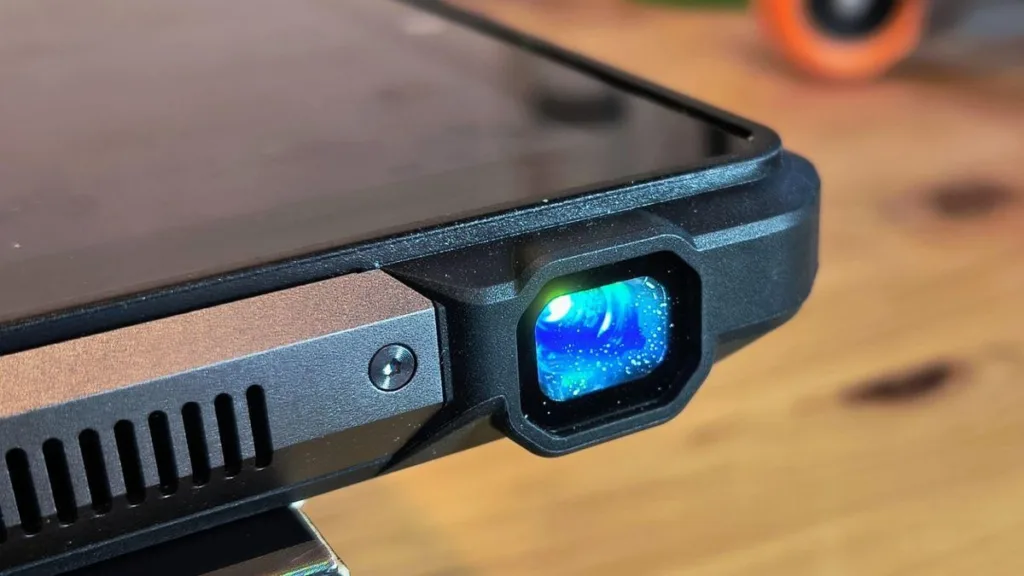
A built-in projector turns any wall or surface into a screen for safety briefings, plan reviews, or crew training. No external monitor or laptop required. Night vision cameras let crews document conditions in unlit spaces like basements, crawl spaces, or early morning starts. A high-resolution main camera captures progress photos for daily reports and dispute prevention.
How to Choose the Right Rugged Tablet for Your Crew
Match the device to the actual demands of your job site. Choosing the best tablet for the construction industry requires a careful balance of durability, performance, and software compatibility. Each role on the job site has unique needs.
| Feature | Minimum for Light Sites | Recommended for Heavy Sites |
| IP Rating | IP65 | IP68 or IP69K |
| Battery | 8,000mAh | 15,000mAh+ |
| Display | 8 inch, 500 nits | 10+ inch, 800+ nits |
| Connectivity | WiFi + 4G | WiFi + 5G + dual GNSS |
Conclusion
The best rugged tablet for construction sites earns its place by surviving what the job throws at it and by making crews faster in the process. Prioritize IP68 or higher protection, a battery that outlasts a full shift, a display readable in direct sunlight, and connectivity that works even in remote locations.
Look beyond basic durability. Devices that bundle field tools like rangefinders, projectors, and night vision cameras reduce the gear your crews carry and the time spent switching between devices. Dual-frequency GPS adds precision for survey and layout tasks that cheaper tablets cannot match.
Evaluate your site conditions honestly. Match the tablet to the harshest scenario your crew will face, not the average day. A device that handles the worst conditions will breeze through everything else. Invest in the right hardware once, and it pays back in uptime, accuracy, and fewer replacements across every project.