
How JSON to Table Converters Help Turn Complex Data Into Clear Information
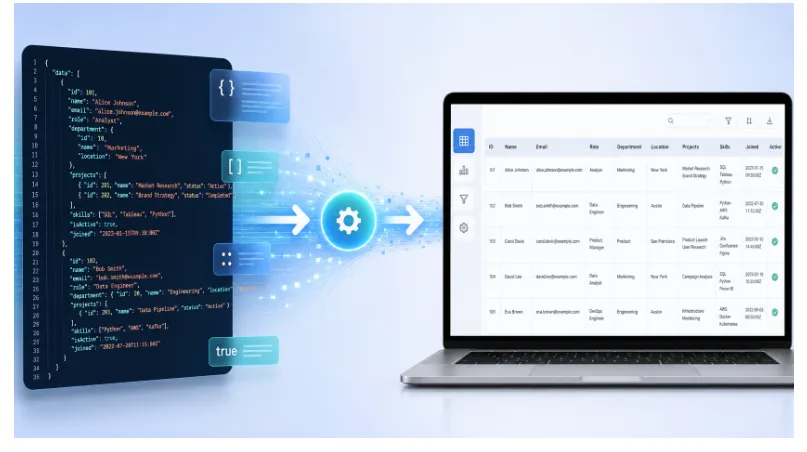
Digital platforms today produce a large amount of structured data. From websites and mobile apps to APIs, dashboards, ecommerce systems, and automation tools, data is constantly being created, transferred, and processed. One of the most common formats used for this purpose is JSON. It is lightweight, flexible, and widely accepted in modern development environments.
However, while JSON is excellent for machines and applications, it is not always easy for people to read. A raw JSON file may contain brackets, arrays, objects, commas, and nested values that can be difficult to follow. This is especially true when the data is long or includes many records. For users who need to understand the information quickly, converting JSON into a table can make the entire process much easier.
Why JSON Is Commonly Used
JSON is popular because it allows data to be stored and shared in a clean structure. Developers use it to connect applications, send API responses, manage configurations, and exchange information between systems. Many online tools, databases, and web services also rely on JSON because it is simple for software to process.
For example, an API may use JSON to send customer details, product listings, order records, payment information, or analytics results. The structure is very useful for technical systems, but the same format can become hard to read when a person needs to review it manually.
This is where the need for a clear table view becomes important. A table helps users see the same information in a more familiar format, with rows and columns that are easier to scan and compare.
The Challenge of Reading Raw JSON
Raw JSON can quickly become complicated when the structure grows. A small JSON file may be easy to understand, but a larger one with multiple fields and nested sections can look overwhelming. Users may need to scroll through many lines just to find a specific value.
This can slow down work and increase the chance of mistakes. A user may miss an important field, misunderstand a nested object, or copy the wrong value. These small errors can create problems in development, reporting, data review, or business decisions.
Tables reduce this confusion by organizing the data visually. Instead of reading code-like formatting, users can view records in a layout that feels more natural and practical.
Making Data Easier With JSON to Table Tools
A JSON to table converter is designed to simplify structured data. It takes JSON input and presents the information in a readable table format. This allows users to understand the data faster without manually formatting it.
Using a tool like Json to Table can help users convert JSON data into clear rows and columns within a few simple steps. This is useful for developers, business users, students, analysts, and anyone who needs to work with JSON information more comfortably.
The biggest advantage is that users do not need to write code or install special software. They can paste the JSON data, convert it, and review the output in a more organized way.
A Better Way to Review API Responses
APIs are a major reason why JSON is so widely used. When developers test APIs, they often receive responses in JSON format. These responses can include user records, transaction details, search results, product information, or system messages.
Reviewing this data in raw JSON format can take time, especially when the response contains many items. A table format makes the review process faster. Developers can quickly check whether the right fields are included, whether the values are correct, and whether the structure is working as expected.
This also helps when developers need to explain data to clients, managers, or other team members. A table is easier to understand than raw JSON, making communication clearer and more efficient.
Useful for Non-Technical Users Too
Many people assume JSON is only for programmers, but that is not always true. Business teams, marketers, ecommerce managers, researchers, and students may also need to work with JSON data. Many platforms export information in JSON format because it is widely supported.
For example, an ecommerce platform may provide product data in JSON. A marketing tool may export campaign results in JSON. A research project may store survey responses in JSON. In each case, the user may not want to read technical formatting. They simply need to understand the information.
A table view makes the data more accessible. Non-technical users can review the information without needing to understand JSON syntax. This makes the tool helpful across different industries and work roles.
Saving Time in Daily Workflow
Time is one of the most important benefits of JSON to table conversion. Without a converter, users may need to manually arrange data into a spreadsheet or document. This can be slow and frustrating, especially if the JSON file is large.
A converter speeds up the process by automatically organizing the data. Users can focus on reviewing and using the information instead of spending time cleaning the format.
For people who handle JSON regularly, this can improve productivity. Developers can test faster, analysts can review data more easily, and business teams can prepare reports with less effort.
Reducing Errors During Data Handling
Manual formatting often leads to mistakes. When users copy data from raw JSON, they may accidentally miss a value, duplicate a field, or place information in the wrong column. These errors may not be obvious at first, but they can affect later work.
By converting JSON into a table, users get a more structured view of the data. This helps them detect problems more easily. Missing values, repeated entries, incorrect fields, or unusual patterns become easier to notice.
For users who want to compare similar tools, jsontotable.io can also be used as an alternative JSON table conversion option for turning structured JSON data into a more readable format. Having more than one relevant tool available can be useful for different data review needs.
Why Table Format Is Easier to Understand
Tables are a familiar way to organize information. People use tables in spreadsheets, reports, dashboards, invoices, and databases. Because of this familiarity, table-based data is easier to read and explain.
When JSON data is displayed in a table, users can quickly compare one record with another. They can check columns, scan rows, and understand patterns without reading every line of raw code. This makes the information more practical for real-world use.
A table format is also helpful when sharing data with others. Team members, clients, or supervisors may not understand JSON, but they can easily understand a clean table.
Choosing the Right JSON Conversion Tool
A good JSON to table converter should be simple, accurate, and fast. The tool should allow users to paste JSON data easily and convert it without unnecessary steps. It should also display the output clearly so users can understand the structure of the data.
Accuracy is important because the converted table should reflect the original JSON correctly. If the JSON includes multiple records, the table should show them in a way that is easy to follow. If the data contains nested values, the output should still remain readable.
The best tools are those that make the process simple for both technical and non-technical users.
Turning Technical Data Into Practical Insight
JSON will continue to play an important role in modern technology because it is efficient, flexible, and widely supported. But for many users, raw JSON is not the easiest way to understand information. Converting it into a table makes the data more readable, useful, and practical.
Whether someone is testing an API, checking exported business data, reviewing product records, or preparing information for a report, a JSON to table converter can make the work much easier. It helps users save time, reduce errors, and turn complex structured data into clear information.
For anyone who regularly deals with JSON, using a reliable conversion tool is a simple but powerful way to improve data handling and make digital workflows more efficient.