
Why a File Uploader Beats DIY in Real Production Environments
At some point in nearly every web application’s life, someone on the team says: “We need to let users upload files.”
It sounds like a small task. Add an input field, wire it to a server route, point it at a storage bucket, and it’s done. But anyone who has shipped a file upload feature into production, and watched it under real traffic, on real devices, over real networks, knows that the gap between a working demo and a reliable upload system is wider than it first appears.
File uploading sits at the intersection of frontend experience, backend infrastructure, network resilience, and security. Each of those dimensions has its own failure modes, and they tend to compound on each other in ways that aren’t obvious until users are already affected.
This article explains what a file uploader actually is, how it works, what makes it genuinely difficult to get right, and what separates a basic implementation from one that holds up in production. Whether you’re building your first upload feature or re-evaluating an existing one, understanding the fundamentals will shape every decision downstream.
Key Takeaways
- A file uploader is more than a button; it’s a complete pipeline that moves files from a user’s device to your storage reliably and securely.
- File uploads become surprisingly complex in real-world conditions: unstable networks, large files, and concurrent users expose gaps quickly.
- Core upload features like resumable transfers, progress tracking, and file validation are expected by users but non-trivial to build correctly.
- Security is a critical and often overlooked part of the upload process; unvalidated uploads are a common attack vector.
- Understanding how file uploaders work is the first step to making the right architectural decision for your application.
Why File Uploads Become Complex in Production
What looks simple in a local environment reveals its true complexity the moment real users arrive.
Here’s where the gaps most commonly appear:
Upload Reliability Across Networks and Devices
Most upload implementations are designed around a best-case scenario: a stable Wi-Fi connection, a modern browser, and a reasonably sized file. That scenario describes a minority of real-world upload attempts.
Your users are on mobile data that drops mid-upload. They’re switching between networks. They’re using older devices with limited memory. They’re uploading 500MB video files from a hotel lobby. When the connection drops in the middle of a large upload and the whole thing has to start over, that’s not a minor inconvenience; it’s a product failure.
Reliable uploads in the real world require chunked transfers, where files are broken into smaller segments and sent sequentially or in parallel. They require retry logic that automatically resumes from the last successful chunk rather than restarting. They require progress indicators that give users feedback so they don’t abandon the upload out of uncertainty. And they require consistent behaviour across a wide range of browsers and operating systems, each of which has subtly different behaviour around file APIs, blob handling, and network requests.
None of this is impossible to build. But each piece requires deliberate engineering, and together they add up to a substantial system.
Scaling Upload Infrastructure
A single-server upload endpoint that works fine for ten simultaneous users will often buckle under a thousand. Upload traffic is bursty; it spikes when your users are most active, which is precisely when you can least afford degraded performance.
Scaling uploads means thinking about more than just compute. Bandwidth costs spike with file volume. Storage architecture needs to account for where files live, how they’re organised, and how they’re retrieved. CDN integration becomes necessary to serve uploaded assets quickly to users in different regions. And the backend logic that processes uploads, virus scanning, format validation, and transcoding needs to scale independently of the upload endpoint itself.
Teams that don’t design for scale from the start often find themselves retrofitting it under pressure, which is significantly harder than building it in from the beginning.
Security Risks in DIY Upload Systems
File uploads are one of the most common attack surfaces in web applications. When you accept a file from a user, you’re accepting external input, and like all external input, it can be malicious.
The risks are varied. Users can upload executable files disguised with image extensions. They can spoof MIME types to bypass basic content checks. They can upload files containing malware that gets executed if the file is opened server-side. They can attempt to exhaust your storage or bandwidth through oversized uploads. Without deliberate security controls at every layer: validation, scanning, access control, and secure delivery, an upload feature is a potential entry point.
This doesn’t mean file uploads are inherently dangerous. It means they require the same security discipline as any other input your application accepts.
Understanding where complexity lives is the foundation for building something that actually holds up. The next step is understanding what a well-designed upload system looks like from the inside.
The Hidden Costs of Building Your Own File Uploader
Building a file uploader from scratch isn’t just a one-time engineering effort; it’s an ongoing commitment.
Here’s what teams often don’t account for when they decide to go the DIY route.
Ongoing Maintenance and Debugging
Web standards evolve, browser APIs change, and cloud storage providers update their SDKs. Operating systems introduce new file system behaviours. Each of these changes can quietly break an upload flow that was working perfectly last month.
A DIY upload system requires someone to own it, to watch for regressions, respond to user-reported failures, and keep integrations current. In a small team, that responsibility tends to fall on whoever built it, which creates a knowledge silo and a recurring maintenance obligation that doesn’t appear on any roadmap until something breaks.
Engineering Time Lost on Non-Core Features
File uploading is infrastructure. It’s the plumbing that makes other features possible. It’s not, in most cases, what differentiates your product from competitors.
Yet teams routinely spend weeks building and refining upload systems, chunking logic, retry handling, progress UI, storage integrations, time that could have gone toward the features that actually drive user value. And because upload requirements tend to grow (users want to import from Google Drive, or upload in bulk, or get email notifications when processing completes), the investment rarely ends with v1.
Performance Optimisation Challenges
Speed matters in uploads. Users who wait too long abandon. Files that arrive slowly create downstream processing delays. Media that isn’t optimised before delivery bloats page load times.
Optimising upload performance involves image compression, adaptive chunking, parallel transfers, geographic routing, and CDN configuration. Each of these is a meaningful engineering problem in its own right. Solving them well, and keeping them solved as your user base and file volumes grow, requires specialised knowledge that most product teams don’t have in-house.
Knowing where DIY systems struggle sets the stage for understanding what a purpose-built solution actually provides, and why the difference matters in practice.
What a Modern File Uploader Provides Out of the Box
A production-grade file uploader is not just a UI widget. It’s an end-to-end system that handles the full lifecycle of a file, from the moment a user selects it to the moment it’s delivered to its destination.
Reliable Upload Experiences
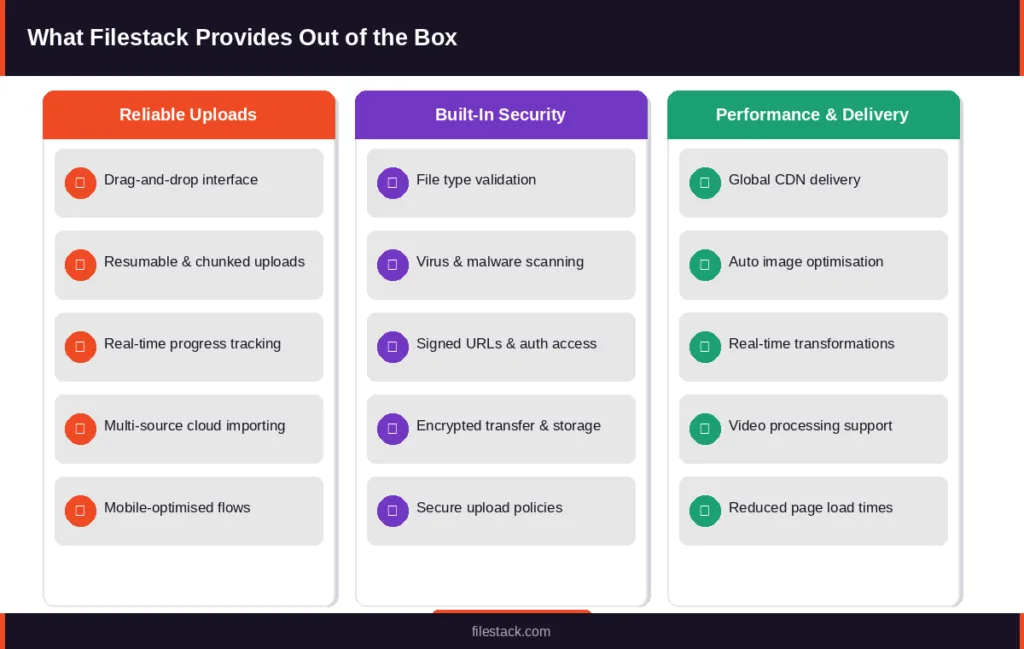
Modern file uploaders handle the complexity of real-world network conditions automatically. Chunked and resumable uploads mean a dropped connection doesn’t mean a lost file. Progress indicators keep users informed and reduce abandonment. Drag-and-drop interfaces lower the friction of the upload action itself.
Beyond basic reliability, well-designed uploaders support multi-source importing, letting users pull files directly from Google Drive, Dropbox, Instagram, or a URL rather than requiring a local file. This seemingly small feature dramatically expands where users can source content without any additional work on your end.
Mobile-friendly upload flows are another area where purpose-built solutions outpace custom implementations. Handling camera access, photo library permissions, and the various quirks of mobile browsers requires testing and compatibility work that goes far beyond what most teams budget for.
Built-In Security Features
Security in a managed file uploader is layered and systematic rather than ad hoc. File type validation checks both the declared type and the actual file contents, not just the extension. Virus and malware scanning integrations catch dangerous payloads before they reach storage. Signed URLs ensure that upload permissions are time-limited and authenticated, preventing unauthorised access. Encryption in transit and at rest protects files throughout their lifecycle.
These aren’t features you configure once and forget; they’re maintained, updated, and tested continuously by teams whose entire focus is on upload infrastructure security.
Faster Media Processing
Uploading a file is often just the first step. Images need to be resized and optimised for different display contexts. Videos need to be transcoded into web-compatible formats. Documents need to be processed and indexed. A modern file uploader integrates these processing steps into the upload pipeline, so files arrive at their destination ready to use, not as raw uploads that require additional transformation work.
CDN-backed delivery means processed files are served from edge locations close to your users, reducing latency for everyone regardless of geography.
These capabilities represent what “done right” looks like for file uploads. But it’s worth grounding them in the concrete lessons that teams learn when they go the other direction.
Production Lessons Teams Learn Too Late
The patterns that emerge from teams who’ve shipped their own upload systems are remarkably consistent. These are the lessons that tend to land hardest and latest.
Small Upload Problems Become Large User Experience Issues
A failed upload feels like a small technical event. But from a user’s perspective, it’s a broken experience. They selected a file, waited through a progress bar, and then got an error. The question “do I try again or give up?” is one users shouldn’t have to ask, and many will answer it by leaving.
Upload reliability has a direct relationship with conversion rates, task completion, and user trust. For applications where uploading is part of the core user journey, submitting a portfolio, sharing a document, posting media, upload friction is product friction. Teams that treat upload reliability as a secondary concern often discover its importance through churn data rather than through proactive engineering.
Infrastructure Costs Grow Faster Than Expected
Storage and bandwidth are visible line items. The less visible costs are harder to anticipate: monitoring infrastructure, logging systems, on-call engineering time, incident response, and the compounding effect of technical debt in the upload layer.
Upload infrastructure costs don’t scale linearly with usage; they tend to spike during traffic peaks, which is exactly when they’re most disruptive. Teams that didn’t plan for this find themselves making reactive infrastructure decisions under pressure, which is both more expensive and more error-prone than planning ahead.
Security and Compliance Expectations Increase Over Time
An upload system built quickly for early users often carries implicit assumptions about who those users are and what they’ll upload. As products grow into enterprise markets, those assumptions stop holding. Enterprise customers ask about data residency, audit logging, access controls, and compliance certifications. Security teams conduct vendor reviews. Data protection regulations require specific handling for certain file types.
Retrofitting a homegrown upload system to meet these expectations is technically complex and organisationally disruptive. Teams that recognise this pattern early and build on a foundation that already provides these guarantees spend significantly less time on compliance work as their products mature.
DIY Upload Stack vs Managed File Uploader
Once you understand what a reliable upload system actually requires, the natural question becomes: should you build it yourself or use a purpose-built solution?
Both paths are real options, but they come with very different tradeoffs across the dimensions that matter most in production.
| Dimension | DIY Build | Managed (Filestack) |
| Development Speed | Weeks to reach production-grade | Hours to days, production-ready on day 1 |
| Reliability & Uptime | Team-dependent, degrades under load | SLA-backed, monitored 24/7 |
| Security Coverage | Manual, incremental, often incomplete | Validation, scanning & signed URLs built-in |
| Resumable Uploads | Complex, must be built from scratch | Built-in, zero configuration needed |
| CDN / Global Delivery | Requires extra architecture and cost | Included globally out of the box |
| Media Transformations | Requires separate services & pipelines | Image, video & doc processing built-in |
| Annual Maintenance | 2–4 weeks of engineering time per year | Near zero, handled by Filestack |
| Total Cost of Ownership | High, hidden costs compound over time | Predictable pricing, lower overall TCO |
Development Speed
A basic DIY upload implementation can reach a working state in a day or two. The gap opens up when you factor in everything that makes it production-ready: chunked transfers, retry logic, mobile compatibility, progress UI, storage integrations, security controls, and monitoring. Reaching that level of maturity typically takes weeks to months, depending on team size and competing priorities.
A managed file uploader ships all of that on day one. Integration is typically measured in hours, and the production-grade capabilities are available immediately, not after a series of incremental improvements under production pressure.
Reliability and Uptime
A DIY system’s reliability is a direct function of how much engineering attention it receives. In practice, upload infrastructure competes with product features for that attention, and often loses until something breaks. Failure modes that weren’t anticipated during development surface under real traffic, and fixing them requires context that only the original author may have.
A managed solution is maintained by a team whose sole focus is on the upload infrastructure. Reliability improvements, bug fixes, and compatibility updates happen continuously, backed by SLAs and monitored 24/7. Your team inherits that reliability without owning the operational burden that produces it.
Feature Availability
Building features like resumable uploads, multi-source cloud importing, drag-and-drop interfaces, image optimisation, and video transcoding is each a meaningful engineering project on its own. Combined, they represent weeks or months of work, and ongoing maintenance after that.
With a managed file uploader, these capabilities are available by default. Teams can focus on how to use them in their product rather than how to build and maintain them in their infrastructure.
Total Cost of Ownership
The upfront cost of a DIY upload system looks low, a few days of engineering time to get to a working state. The real cost becomes visible over time: maintenance hours, incident response, the opportunity cost of features not built, and the compounding complexity of technical debt in the upload layer.
A managed solution replaces variable, hidden costs with a predictable pricing model. When you account for engineering time honestly, the economics typically favour a managed approach well before your product reaches any meaningful scale.
When DIY Uploads Still Make Sense
A managed file uploader is the right call for most applications that need reliable, secure, scalable uploads. But there are genuine cases where a simpler approach is appropriate.
Simple Internal Tools
Internal admin tools with a small, known user base, low upload volume, and minimal security requirements may not need the full capability of a managed upload solution. A lightweight custom implementation is often entirely adequate at this scale, and the additional complexity of a managed platform isn’t justified.
Highly Specialised Workflows
Some applications operate in compliance environments with specific requirements around data handling, residency, or infrastructure that don’t map cleanly to a general-purpose upload service. Offline-only systems, air-gapped environments, or proprietary infrastructure requirements may also necessitate a custom approach.
These are real exceptions. For the majority of SaaS products, consumer applications, marketplaces, and enterprise platforms, however, they don’t apply.
Choosing the Right File Uploader for Your Application
Once you’ve decided that a managed solution makes sense, the evaluation process matters. Not every file uploader is built for the same use cases.
Key Features to Evaluate
The capabilities that distinguish production-grade solutions from basic ones include scalability under concurrent load, SDK availability across the platforms your team uses, API flexibility for custom upload flows, security controls that meet your compliance requirements, media processing capabilities, built-in CDN support, and monitoring tools that give visibility into upload success rates and failure patterns.
Pay particular attention to how a solution handles failure. A file uploader that can’t tell you why uploads are failing, and can’t automatically recover from common failure modes, creates an operational burden rather than reducing it.
Questions to Ask Before You Commit
Before adopting any file upload solution, it’s worth getting clear answers to a few practical questions.
- How are failed uploads detected and retried?
- Which cloud storage providers are supported natively?
- Is global CDN delivery included, or does it require additional configuration and cost?
- How does pricing scale as upload volume grows?
- What security protections are enabled by default, and which require explicit configuration?
The answers reveal how much operational work the solution actually offloads, and how much remains on your team.
How Filestack Approaches File Uploads
Filestack is designed around the premise that file upload infrastructure shouldn’t be something your team rebuilds from scratch, maintains under pressure, or scales reactively.
Unified Upload Infrastructure
Rather than requiring teams to wire together separate services for upload handling, storage integration, media processing, and delivery, Filestack provides all of these as a unified platform. The result is fewer integration points, fewer failure modes, and a simpler operational picture. Teams that have consolidated their upload stack onto Filestack typically find that upload-related engineering work drops significantly, both in terms of new feature development and ongoing maintenance.
Developer-Friendly Integration
Filestack provides SDKs for web, iOS, and Android, with an API designed for flexibility. The upload widget is customisable to fit your application’s design without requiring a ground-up build, and cross-platform consistency means you’re not maintaining separate upload implementations for different surfaces. Integration timelines are measured in hours rather than weeks.
Built for Scale
Large file handling, resumable transfers, concurrent upload sessions, and global CDN delivery are built into Filestack’s infrastructure, not bolted on as optional features. As your application grows, the upload layer grows with it without requiring your team to re-architect anything.
Conclusion
File uploading is one of those features that appears simple and reveals its depth slowly, usually through production incidents, user complaints, or a security review that turns up something you didn’t expect.
Understanding what a file uploader actually involves: the network resilience, the security controls, the media processing, and the scalability requirements, is the foundation for making a good architectural decision. Some teams will build their own and accept the tradeoffs. Others will recognise that upload infrastructure isn’t where their engineering investment creates the most value.
Either way, the decision is better when it’s made with a clear picture of what’s actually involved. Filestack exists for teams that want a reliable, secure, scalable upload layer without the overhead of building and maintaining one themselves.
Learn how Filestack’s file uploader helps teams simplify secure uploads, media processing, and CDN-backed delivery at production scale.
FAQs
What is a file uploader?
A file uploader is a software system that manages the process of transferring files from a user’s device to a server or cloud storage destination. It typically includes a frontend interface (such as a drag-and-drop widget), backend handling logic, storage integration, and features like progress tracking, retry handling, and file validation.
How does a file uploader work?
When a user selects a file, the uploader breaks it into chunks (for large files), sends those chunks to a server or directly to cloud storage, tracks progress, handles errors and retries automatically, and confirms successful delivery. Most modern uploaders also perform validation and processing steps as part of this pipeline.
What is the difference between chunked and standard file uploads?
Standard uploads send the entire file in a single request. If the connection drops, the upload fails and must restart from the beginning. Chunked uploads divide the file into smaller segments and track which segments have been delivered. A dropped connection only requires re-sending the failed chunk, not the entire file, making chunked uploads significantly more reliable for large files or unreliable networks.
What security risks are associated with file uploads?
Common risks include uploading executable files with spoofed extensions, MIME type manipulation to bypass content checks, malware-containing documents, and oversized uploads designed to exhaust storage or bandwidth. Secure upload systems address these through file type validation, virus scanning, size limits, authenticated upload permissions, and encrypted transfer.
Why do file uploads fail?
Upload failures are most commonly caused by network interruptions, file size limits, browser compatibility issues, server-side validation errors, or storage configuration problems. A well-designed uploader handles most of these failure modes automatically through retry logic, chunking, and clear error reporting.
What is a resumable upload?
A resumable upload is one that can be paused and restarted without starting from the beginning. The upload system tracks which portions of the file have been successfully transferred, and on reconnection, continues from the last successful point. This is especially important for large files and mobile users on unreliable connections.
What features should I look for in a file uploader?
Key features include resumable and chunked uploads, drag-and-drop support, progress tracking, multi-source importing, file type validation, virus scanning, signed URLs, encryption, CDN-backed delivery, media processing capabilities, and cross-platform SDK support.
What is the difference between file uploading and file storage?
File uploading is the process of moving a file from a user’s device to a server or storage system. File storage is where the file lives after it has been uploaded. These are related but distinct concerns; an upload system handles the transfer; a storage system handles persistence, retrieval, and delivery.
Can a file uploader handle video and large media files?
Yes, purpose-built file uploaders are designed to handle large files through chunked transfers, parallel uploads, and adaptive retry logic. Many also include video transcoding and processing as part of the pipeline, so files arrive in formats ready for web playback.
How does a file uploader affect page load performance?
The file uploader itself has minimal impact on page load when implemented correctly. Where performance matters most is in the delivery of uploaded assets: images, videos, and documents that were uploaded by users and served back to other users. CDN-backed delivery and automatic image optimisation, both features of managed upload solutions, significantly reduce asset delivery times.