
VSDC 11.1 Adds Native Insta360 Support, GPS Telemetry and Workflow Enhancements for Video Editors
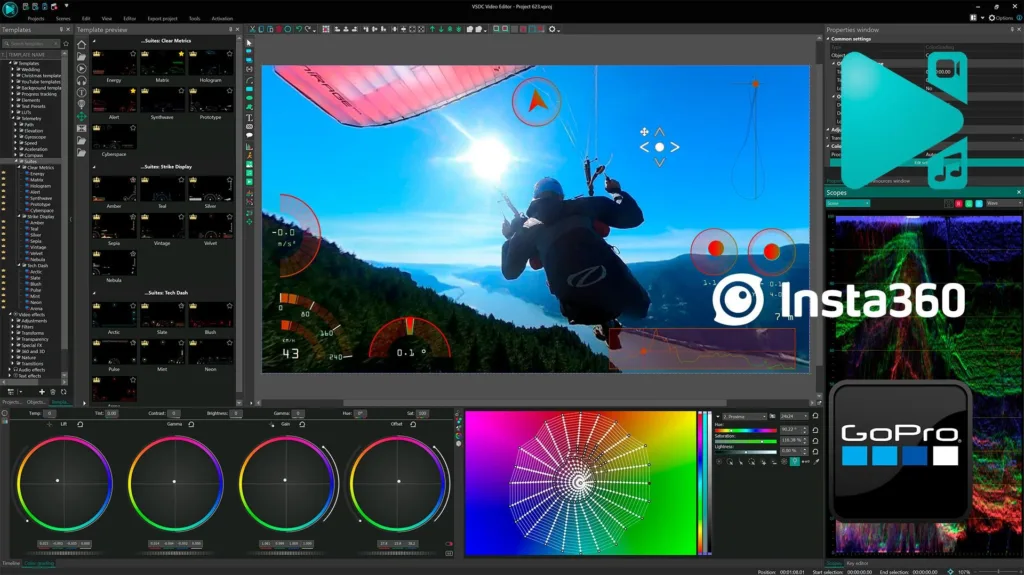
The latest update to the free VSDC Video Editor focuses on eliminating third-party converters, improving project stability and introducing data-driven overlays for action camera footage.
For content creators working with 360° footage, the post-production pipeline has often required a frustrating extra step: converting proprietary .insv files before editing could even begin. The VSDC 11.1 update removes that bottleneck with native support for Insta360 cameras, alongside GPS telemetry integration and several stability-focused features.
Why Native Support Matters for 360° Creators
The action camera market has grown significantly in recent years, with Insta360 becoming a popular choice among travel vloggers, cyclists, skiers and motorsport enthusiasts. However, editing footage from dual-lens cameras has traditionally required proprietary software or third-party converters. This extra step not only slows down workflows but can also lead to quality loss or desynchronized audio.
VSDC 11.1 addresses this by allowing users to import .insv files directly into the timeline without any pre-processing. The conversion from fisheye to standard 2D video happens internally using a new effect called “360 to 2D”, accessible by right-clicking any clip and navigating to Video Effects → 360 and 3D. Once applied, editors can adjust field of view, edge blending and convergence angles along the X and Y axes.
For those who prefer a more stylized look, the same effect now includes a one-click fisheye output option.
GPS Telemetry: From Sensor Data to On‑Screen Graphics
Beyond visual editing, VSDC 11.1 introduces a feature that will appeal to data-driven storytellers: GPS telemetry visualization. If a user records video with an Insta360 camera or a companion GPS tracker, the software can extract location and speed data and turn it into on-screen graphics.
Speedometers, altitude charts, animated route maps, etc. can be added using built-in templates. According to the development team, GPS data can be extracted directly from video files or imported as separate files when available.
A practical example: a mountain biker descending a trail can overlay a real-time speedometer that shows exactly how fast they were going at each moment. A road trip vlogger can add an animated route map that traces their journey from start to finish. These small additions significantly increase viewer engagement, especially for travel and sports content.
That said, stable GPS signal reception during recording is required for accurate results. Users are advised to consult official Insta360 documentation for camera-specific telemetry setup instructions.
Workflow Improvements That Save Time
While new camera support and telemetry features get the spotlight, several under-the-hood improvements in VSDC 11.1 are equally valuable for daily use.
Auto-Save is now enabled by default, saving projects every 15 minutes. Editors no longer need to worry about losing hours of work due to a power outage or system crash. The interval can be adjusted at any time under Options > Saving Options.
Enhanced waveform visualization provides higher detail rendering, making it easier to spot quiet passages, transients and beat markers. Users can also enable an option to generate waveforms automatically as soon as a video is added to the timeline.
New timeline navigation controls have been added to the bottom-left corner of the timeline, allowing for faster zooming, scrolling and frame-accurate trimming.
Stability fixes have been applied across the board, with particular attention to effect-related crashes and HDR display engine behavior across different hardware configurations. For HDR enthusiasts it means footage now looks exactly as intended, regardless of the monitor setup.
Addressing User Feedback
The VSDC development team has been transparent about incorporating user feedback into this release. Several of the fixes and features in version 11.1 were directly requested by the community through support tickets and forum discussions.
For those interested in trying the new version, the software remains free to download and use, with no watermarks on exported videos.
FAQ: Common Questions About VSDC 11.1
Q: Is updating necessary for Insta360 users?
A: Yes. Telemetry reading for these videos was not available in earlier versions. The 11.1 update enables native import, GPS data extraction and speedometer or route map overlays.
Q: What if my GPS data doesn’t display correctly?
A: This typically indicates an unstable signal during recording. Verify your recording settings in the Insta360 app. Detailed setup guides are available on the official Insta360 website.
Q: Can I change how often auto-save runs?
A: Absolutely. The default is 15 minutes, but you can adjust it under Options > Saving Options to any interval you prefer.
Q: Does the fisheye effect work on any 360° video?
A: Yes. The “360 to 2D” effect now includes a fisheye option, so you can achieve that ultra-wide action sports look with just one click, regardless of which camera you used.
Availability and Links
VSDC Video Editor 11.1 is available for download on Windows. For more information, visit the official website.
User feedback, feature requests and project submissions can be directed to support@videosoftdev.com