
How to Lead an Interactive Fireside Chat on Zoom in 2026
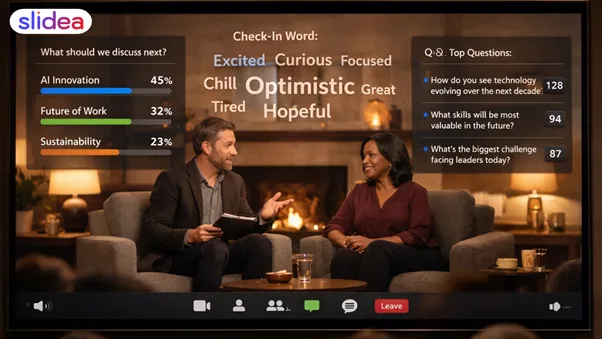
A fireside chat on Zoom should feel warm and personal—but in 2026, it is an AI-powered workspace, not just a video call. If participation is not designed into the flow, these sessions default to passive viewing, multitasking, and silent drop-offs. The fix isn’t to “ask more questions”. The fix is to design clear audience signals (polls, Q&A voting, structured chat prompts) that AI Companion can capture, group, and summarise—without interrupting the guest.
This guide explains how to host an interactive fireside chat on Zoom in 2026 by designing participation into the flow—using the AI features, structured interaction points, and clear audience signals.
What makes a fireside chat interactive on Zoom?
In 2026, an interactive fireside chat on Zoom is still host-led—but participation is captured as signals (polls, Q&A voting, short chat prompts) that Zoom AI Companion can cluster and summarise while the conversation stays natural.
That participation can look like:
- Zoom polls to decide which topic to explore next
- One-word chat prompts that give Zoom AI Companion clean input to cluster themes (e.g., “One word: what’s hardest right now?”)
- Zoom Q&A with voting to prioritise audience questions
- Short, on-screen prompts that remove hesitation
- AI-generated summaries that surface dominant themes, sentiment direction, and repeated concerns in real time
Why audience signals matter in 2026
In 2026, interaction signals are not just engagement—they are structured data. Poll choices indicate priority. Q&A voting reveals shared pain points. One-word chat prompts expose sentiment trends. When Zoom AI Companion clusters these signals, hosts gain a live map of audience interest that can guide follow-up sessions, content planning, and future session design.
The idea is to avoid distracting the guest every minute. The aim is to provide different opportunities for participation so that the focus does not escape.
Before the session: Design the chat like a show
1) Pick one theme and 3 sub-topics
Interactive sessions work best when the audience understands the storyline. Choose:
- One main theme (example: Leadership lessons from scaling teams)
- Three sub-topics (example: Hiring, Culture, Tough decisions)
This simplifies your interaction moments because your polls and Q&A may be sent to those sections.
2) Create audience questions in advance (yes, even for a live chat)
Create 6–10 short, constrained prompts (one word / one option / one sentence). These formats improve AI clustering, reduce hesitation, and keep responses readable live.
- Which challenge is hardest right now?
- Choose one: speed or quality. (Two clear options help faster polling and a cleaner AI summary.)
- Drop one word: what should we discuss next?
These prompts give Zoom AI clearer signals to group responses, identify patterns, and generate accurate post-session summaries.
3) Create 5-8 interactive slides, basic and not heavy.
Zoom captures participation well—but it doesn’t design participation. Slides act as the timing layer that tells the audience when to respond and tells Zoom AI what to capture. That’s why interactive presentation tools help: they put the question on screen at the exact moment, so people respond faster, and Zoom AI can capture cleaner input.
Keep it minimal:
- 1 welcome and agenda slide
- One warm-up topic.
- 3 topic transition polls (one per segment)
- 1 Q&A collection slide
- 1 closing thought question.
When the audience sees a question on screen, they answer more quickly than if you simply repeat it loudly.
This reduces cognitive load by removing ambiguity and gives participants a clear permission moment to respond.
A 45-minute Zoom fireside conversation flow :
Welcome and rules (3 minutes)
Start friendly and specific:
- This is a fireside chat, not a lecture.
- You can join through chat any time.
- We’ll pause every 8–10 minutes for one quick audience moment.
Then do a warm-up check-in:
- Chat request: “Where are you joining from?”
- Just one word: “How’s your week in one word only?”
This turns silent viewers into present participants.
Set context (5 minutes)
Host asks two quick questions:
- What’s your role today?
- What are you focused on this year?
Keep answers short. You’re building comfort.
Segment 1: Topic Block 1, 60-second vote (10 minutes)
Allow the guest to talk, but not for too long. Around minute eight, pause with:
- A quick poll: Which area should we go deeper on next?
Show results immediately. That visual feedback keeps people engaged because they feel seen.
Segment 2: Topic Block 2, Chat Request (10 minutes)
Here, use a short audience request:
- Type one challenge you’ve faced related to this.
Read 2-3 responses openly and connect them with the guest:
- I noted ‘alignment’ and ‘time zones’—how did you manage that?
This is a wonderful trick: the audience gets benefit, but the guest remains important.
Segment 3: Topic Block 3, Q&A (12 minutes)
- Instead of asking, “Any questions?” (which results in quiet), collect questions in an arranged format:
- Collect questions using Zoom Q&A with voting enabled. Give it 2–3 minutes to fill while the guest finishes a thought, then use AI Companion clustering to remove duplicates, surface the top themes, and identify where audience attention is converging. Transition like this:
- “Zoom AI grouped the top questions around hiring and culture trade-offs—let’s start there.”
- If you use presentation software, you may gather all of your questions in one spot and rapidly select the most important ones. It also helps avoid repeated queries and gives the presenter more control over time.
Segment 4: Closing reflection, next step (5 minutes)
End with something easy:
- “One takeaway you’re leaving with—type it in chat.”
After the session: turn audience signals into follow-up intelligence
A well-designed fireside chat does not end when the Zoom call closes. The polls, Q&A votes, and chat prompts collected during the session form structured audience signals.
Poll results reveal which topics mattered most.
Q&A voting highlights shared pain points.
One-word chat responses expose sentiment direction and urgency.
When Zoom AI Companion clusters these signals, hosts gain a clear picture of audience intent. These insights can be used to shape follow-up emails, prioritise future session topics, identify high-interest participants, and design the next fireside chat using real audience language rather than assumptions.
How to maintain a natural conversation
Use soft interaction.
Not every engagement moment requires a significant transformation. Use commands like this:
- If that applies to you, type yes.
- Drop a number from 1 to 5.
- One word: agree or disagree?”
These are low-pressure and fast.
Pause with purpose
Silence is not failure. On Zoom, people need a few seconds to type. Train yourself to wait:
- In 2026, pauses should be designed: show the prompt on a slide, keep it on screen for 8–10 seconds, and let AI capture responses without awkwardness.
- Then start reading responses
Give clear instructions every time
Instead of sharing your thoughts, say:
- Type one sentence in chat.
- Pick one option.
- Write one word only.
The simpler the lesson, the greater the involvement.
FAQ
1) How long should a fireside chat on Zoom be in 2026?
A strong range is 30 to 45 minutes. If it goes longer, attention drops unless you add clear interaction breaks.
2) How do I encourage people to participate without calling them out?
Use simple questions and read responses without identifying individuals unless they request it.
3) Should I use slides for a fireside chat?
Yes, but just lightly. A few slides help the audience understand the flow. If you use interactive presentations, you can collect votes and questions more efficiently than if you just use open chat.
4) What’s the best way to manage Q&A on Zoom?
Collect questions in a single tab, encourage voting, and select the top 5-7 questions. This keeps the Q&A fair and prevents repetition.
5) What if my audience remains silent even after asking?
Start smaller. Ask a super-easy warm-up (location, emoji reaction, one-word check-in). Once a few people respond, the rest usually follow.
6) Should I enable Zoom AI Companion for a fireside chat?
Yes. Use it to cluster repeated questions, summarise audience themes, and generate post-session insights. Treat AI as a moderator—not a decision-maker.