
Best Pokémon Go Spoofer for iOS & Android in 2026

Pokémon GO is more fun when you can explore different places, join special raids, or catch region-exclusive Pokémon. But in real life, not everyone can travel whenever they want. Bad weather, long distance, busy schedules, or limited local PokéStops can make the game feel slow.
That’s why many players look for a reliable Pokémon Go spoofer to change their GPS location. If you’re searching for the best Pokémon Go spoofer for both iOS and Android, this guide will help you choose the right option.
In this article, we’ll introduce several popular GPS spoofing apps, with a full focus on PoKeep Location Changer, one of the easiest and most beginner-friendly choices.
What is Pokémon Go Spoofing?
Pokémon Go spoofing means changing your phone’s GPS location to a different place so the game thinks you are somewhere else. Instead of physically walking to a location, you can “teleport” to a new city or simulate realistic movement with a joystick or route.
Many players use spoofing to:
- Catch region-locked Pokémon
- Join raids in busy cities
- Hatch eggs faster (with simulated walking)
- Visit PokéStops without traveling
Best Pokémon Go Spoofer for iOS & Android in 2026
1. PoKeep Location Changer (Recommend)
PoKeep Location Changer is one of the best choices for players who want a clean, simple, and stable way to spoof Pokémon GO on iPhone and Android. It helps you change your GPS location in just a few clicks, without complicated setup. If you’re searching for the best spoofer for Pokémon Go that balances ease of use and strong performance, PoKeep is a great pick.
Key Features of PoKeep Location Changer
Here are the main reasons why PoKeep stands out:
- Works on iOS and Android, compatible with almost all phone models and systems
- No jailbreak or root required
- Five movement modes to stimulate realistic walking and change location anywhere
- Adjustable speed (walking, cycling, driving) and custom routes to choose from
- Easy map search by address or coordinates
- Beginner-friendly interface with clear buttons and steps
- Cooldown timer and safe settings keep your account from getting banned
- Advanced features like favorites and history save commonly used locations for quick reuse.
How to Use PoKeep Location Changer (Step-by-Step Guide)
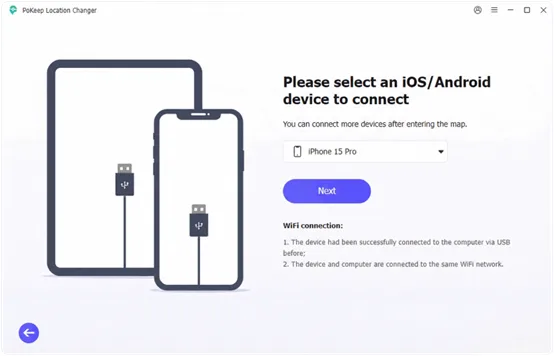
- Download and install PoKeep Location Changer on your Windows or Mac computer. Connect your iPhone or Android phone to the computer using a USB cable. Click Next.
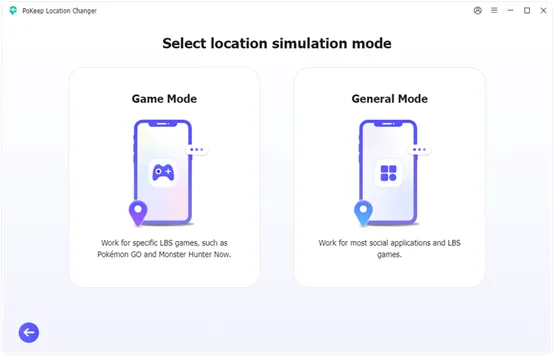
- For iOS users, enable Developer Mode according to the on-screen guide. For Android users, enable Developer Mode and USB Debugging according to the on-screen guide. Choose Game Mode for a safe spoofing.
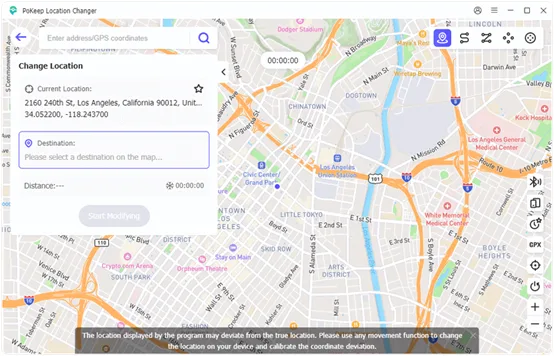
- On the map page, click a destination on the map, or search for a city or GPS coordinates. Then click Start Modifying.
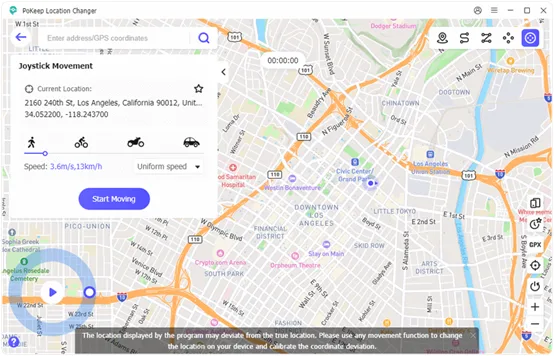
- Launch Pokémon GO and your in-game character should appear in the new place. Use movement or joystick modes to simulate walking naturally and avoid suspicious movement.
Tip: If you teleport far away, wait a realistic cooldown time before catching Pokémon or spinning PokéStops.
2. MagFone Location Changer
MagFone Location Changer is another popular GPS spoofing tool that supports iOS and Android. It’s designed for users who want a straightforward way to change their GPS location without complex setup.
Pros:
- Cross-Platform Support: Works on both iOS and Android, giving flexibility for players on different devices.
- Straightforward Teleport Mode: Quickly change your GPS location with minimal steps.
- Route Simulation: Allows route-based movement, useful for walking/hatching paths.
Cons:
- Connection Stability Issues: May disconnect during long route sessions or when switching distant locations.
- Map Responsiveness Lags: On slower computers or older devices, the interactive map may respond slowly, making it harder to select precise locations.
- No Cooldown Guidance: Doesn’t help users manage Pokémon GO cooldown timing to reduce ban risk.
3. TunesKit Location Changer
TunesKit Location Changer is another recommended fake GPS tool that offers robust location spoofing and movement simulation without jailbreaking. It’s a more comprehensive tool that, in addition to spoofing location in Pokémon, is also effective for changing the location in social and dating apps.
Pros:
- Precise GPS Control: You can select exact locations using search or map navigation.
- Favorites List for Hotspots: Save best catch spots for quick access later.
- History Log: Keeps track of recent spoofed locations for easier repeat use.
Cons:
- Limited Features in Basic Version: Some advanced functions, such as multi-spot route planning or high-speed simulation, may require purchasing a paid license.
- Limited Android Focus: Primarily designed for iOS, so Android support may be inconsistent or limited.
- Less Official Support: Documentation and customer service may be limited.
4. PoGoskill
PoGoskill is a location changer tool tailored to Pokémon GO players and other location-based games. It advertises itself as specializing in Pokémon location spoofing, but it’s relatively expensive and its effectiveness in changing the location for other apps is limited.
Pros:
- No Jailbreak for iOS: Works on iPhones without jailbreaking, keeping device safety intact.
- Teleport Anywhere: Easy teleportation to far locations for exclusive Pokémon and special raids.
- Route & Speed Options: Built-in support for walking or jogging simulation.
Cons:
- Ban Risk: As with all spoofing tools, unnatural movement without cooldowns may increase ban chance.
- Less Intuitive for New Users: Beginners might find the interface and setup slightly more complex compared to simpler tools.
- Paid Version: Pricing is higher compared to other tools.
How to Spoof Safely Without Getting Banned
Spoofing can be risky if you move too fast or behave in ways that look unnatural. Pokémon GO has anti-cheat systems, so safety matters.
Here are smart tips to reduce risk:
- Follow Cooldown Rules
If you teleport far away, don’t immediately catch Pokémon or spin PokéStops. Wait a realistic amount of time.
- Avoid “Jumping” Too Frequently
Constant teleporting every few minutes can look suspicious. Try staying in one area longer.
- Use Walking Speed, avoid moving too fast
When using route simulation, keep movement realistic. Walking speed is usually safer than fast driving speed.
- Don’t Use Modded Pokémon GO Apps
Many bans happen because players use modified versions of the game. A safer method is using a GPS tool while keeping the official Pokémon GO app.
- Don’t Spoof During Big Events Too Aggressively
During events, activity is monitored more closely. Be extra careful.
Conclusion There are many tools available for GPS location changing, but choosing the right one depends on safety, ease of use, and device compatibility. If you want a simple, stable, and beginner-friendly option, PoKeep Location Changer is an excellent choice for the best Pokémon Go spoofer. Whether you’re learning how to spoof in Pokémon Go for raids, rare Pokémon, or better gameplay, always remember to spoof responsibly and follow safe movement rules to reduce ban risk.