
The Rise of Phone SSDs: Why Mobile Creators Need More Than Cloud Storage
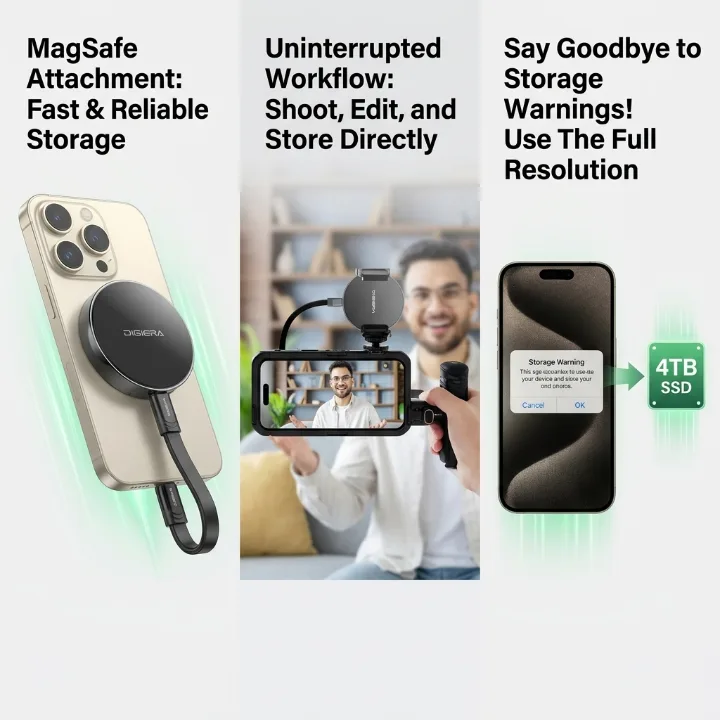
Smartphones have become serious creative tools.
A few years ago, most people used their phones for casual photos, short clips, and quick social posts. Today, creators are filming 4K videos, shooting product content, recording travel footage, editing short-form videos, saving AI-generated assets, and managing full campaign folders directly from their phones.
The camera has improved. The creative apps have improved. Storage has not kept up at the same pace.
For mobile creators, storage is no longer something to think about after a phone is full. It is now part of the creative workflow. That shift is one reason phone SSDs and portable SSDs are becoming relevant for everyday users, not just professional videographers.
Mobile Creation Has Outgrown Phone Storage
The modern creator does not need a full studio to produce content. A phone, a few apps, and a good idea can be enough to create a product video, vlog, tutorial, social campaign, or client asset.
But the files behind that content are getting larger. A single creator may save raw video clips, edited versions, thumbnails, captions, AI-generated images, background assets, voiceovers, screenshots, and final exports. Even short-form videos can produce dozens of files before one post goes live.
When the Storage Warning Interrupts the Shoot
For iPhone users, the problem is sharp. Newer iPhones shoot video that looks good enough for professional social campaigns, and high-quality video eats space fast. Once a phone shows a storage warning, the creator has to stop and choose: delete old footage, move files somewhere else, buy more cloud storage, or lower the quality of future content.
None of those options feels ideal mid-shoot. That is why more creators are looking beyond phone storage alone.
Cloud Storage Helps, But It Is Not Always Enough
Cloud storage has a clear place in modern content creation. It makes sharing easier, it lets users reach files across devices, and it can help with backups and collaboration.
It also has limits. Uploading large 4K files can be slow, especially from hotels, airports, outdoor locations, coffee shops, or crowded Wi-Fi networks. Some creators work while traveling, where access is inconsistent. Others simply do not want every large file, personal video, or client asset to depend on a monthly subscription.
Cloud storage works well for sharing. It is less convenient as the only place for active creative files.
For users who want more control over large files, reliable external storage you own outright can act as a local layer alongside cloud backup.
The smartest workflow is not cloud versus local storage. It is cloud plus local. The cloud handles sharing and remote access. A local SSD handles large active files, fast transfers, offline access, and backups.
What Is a Phone SSD?
A phone SSD is a compact external storage device designed to work with smartphones, especially USB-C phones such as newer iPhone models. Instead of relying only on internal phone storage or cloud plans, users can move large files to a physical drive.
For mobile creators, this is useful because the phone is often where the content starts. A creator may shoot video on an iPhone, save AI-generated assets from mobile apps, record behind-the-scenes footage, and export clips for social media, all from the same device.
A a compact phone SSD can help mobile creators shoot, store, and move large files without waiting until their phone is almost full.
How It Differs From a USB Flash Drive
Phone SSDs are not the same as ordinary USB flash drives. A basic flash drive may handle small documents or casual transfers, but creators usually need higher speed, more capacity, and better support for large media files. A phone SSD is closer to a creator workflow tool than a simple file-transfer accessory.
Why Portable SSDs Are Becoming Everyday Creator Gear
A creator’s storage device needs to do more than hold files. It needs to move between phone, tablet, laptop, and editing software. It needs to be small enough to carry. It needs to transfer large folders quickly. It needs to work offline. Most of all, it needs to fit the way creators actually work.
That is why the portable SSD category is growing beyond traditional laptop backups.
A fast a fast portable drive for everyday shooting gives creators a practical way to keep active files close, move projects between devices, and avoid turning every storage problem into another monthly subscription.
For a travel creator, that means backing up footage without hotel Wi-Fi. For a small business owner, it means keeping product videos and ad assets in one physical place. For a UGC creator, it means shooting more clips without deleting yesterday’s footage. For an everyday iPhone user, it means storing years of photos and videos without constantly upgrading cloud storage.
The 4K Video Problem: Why File Size Matters
The storage problem is not only about how many files people save. It is about how large those files have become. 4K video fills a phone much faster than casual photos, and creators rarely save only one final file.
What One Video Project Actually Contains
A single video project may include:
- Raw iPhone footage
- Vertical and horizontal edits
- AI-generated backgrounds or visuals
- Thumbnail images
- Caption files
- Exported versions for multiple platforms
- Backup copies
This is normal for modern content creation, but it is hard to manage if everything lives only on a phone or in one cloud folder. For creators, storage speed is not just a spec — it decides how quickly they can clear space, back up footage, and keep shooting. A slow transfer turns file management into a daily frustration.
What to Look for in External Storage for Mobile Creators
Not every storage device fits a mobile creator’s workflow. Before buying, think about how you actually create and move files.
The Core Buying Criteria
| Feature | Why It Matters |
| Fast transfer speed | Moves large videos, photos, AI files, and project folders quickly |
| Large capacity | Supports 4K video, long-term photo libraries, and active projects |
| USB-C compatibility | Works with newer iPhones, iPads, MacBooks, Android phones, and laptops |
| Portable design | Easier to carry during travel, shoots, and daily work |
| Simple setup | Lets non-technical users store and move files without a complicated process |
| Offline access | Keeps files available when Wi-Fi is slow, unstable, or unavailable |
Why Design Matters for iPhone-First Creators
For iPhone-first creators, design matters as much as specs. A traditional external drive works on a desk, but it feels awkward during mobile filming. A compact drive that stays close to the phone is far easier to use in real shooting conditions.
The Case for Magnetic Storage
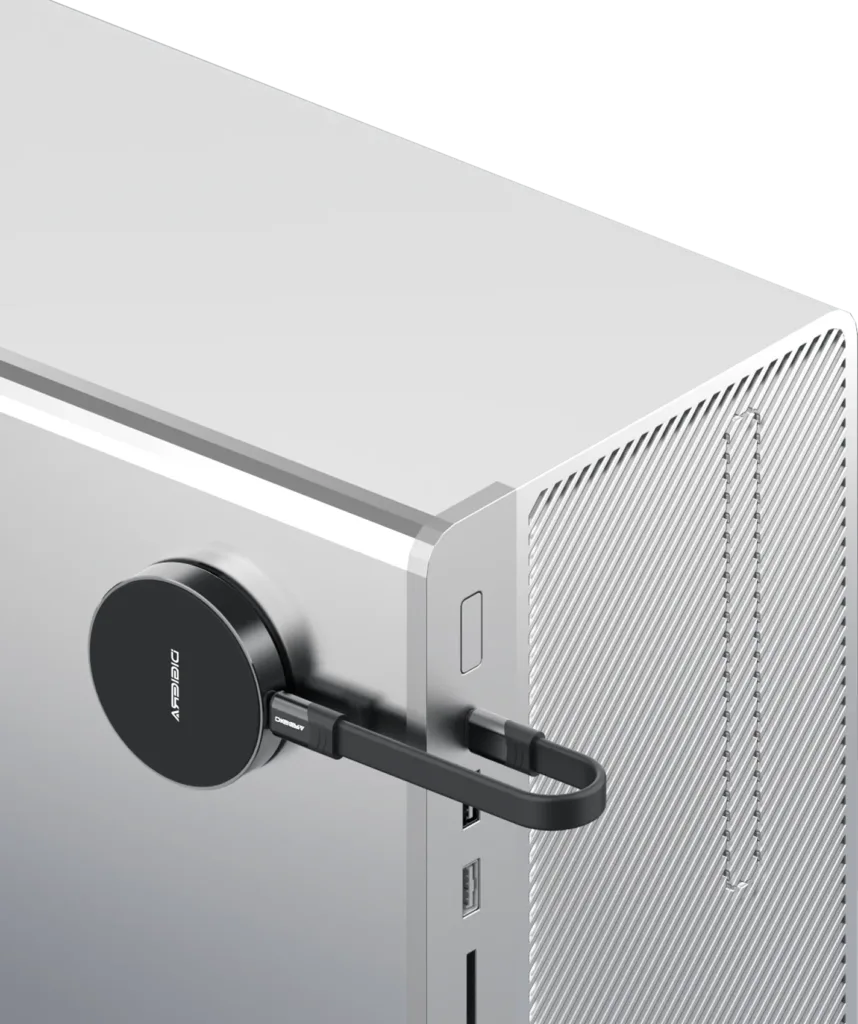
This is why magnetic storage designs are getting attention. They reduce cable clutter and make the storage device feel like part of the mobile setup rather than another loose accessory. Some of these drives now pair a magnetic snap-on design with transfer speeds up to 2000MB/s and capacities from 512GB to 4TB — a spec range built around how mobile creators actually shoot rather than how desktops back up.
Who Needs a Phone SSD Most?
Phone SSDs are not only for professional filmmakers. They help several types of users.
| User Type | Storage Problem | Why a Phone SSD Helps |
| iPhone creators | 4K footage fills the phone quickly | Adds physical storage for video and project files |
| Travel vloggers | Weak Wi-Fi and large media folders | Keeps footage available offline |
| UGC creators | High-volume daily shooting | Makes it easier to organize and transfer clips |
| Small business owners | Product videos and ad assets pile up | Creates a local library for brand content |
| Parents and families | Photos and videos accumulate for years | A one-time storage option beyond cloud plans |
| Tech enthusiasts | Need speed, capacity, and cross-device use | Supports large files and flexible workflows |
A user does not need to be a full-time filmmaker to hit storage problems. Anyone who shoots frequently, saves high-resolution video, or wants more control over personal files can benefit from a better storage setup.
Portable SSD vs. Cloud Storage vs. Phone Storage
Each storage method has a role. The mistake is expecting one method to solve everything.
| Storage Method | Best For | Limitation |
| Phone storage | Quick capture and everyday use | Limited capacity and frequent storage warnings |
| Cloud storage | Sharing, syncing, and collaboration | Monthly cost and internet dependence |
| Portable SSD | Large files, local backup, and active projects | Requires carrying a physical device |
| Traditional hard drive | Long-term archive | Less convenient for mobile shooting |
The best setup is layered. Use phone storage for capture. Use a portable SSD for active files and local backup. Use cloud storage for sharing. Use long-term storage for completed archives. Creators can shoot without worrying as much about phone capacity, move files without waiting on slow uploads, and still use the cloud when collaboration is needed.
A Simple Storage Workflow for Mobile Creators
A better storage system does not need to be complicated.
The Six-Step Routine
- Shoot photos and videos on an iPhone or mobile device.
- Move large clips and project files to a portable SSD.
- Organize files by project, date, or campaign.
- Upload only final files or shared folders to the cloud.
- Keep important footage backed up offline.
- Archive completed projects when they are no longer active.
A Folder Structure That Stays Clean
| Folder | Purpose |
| 01_Raw Footage | Original videos and photos |
| 02_Edits | Working project files |
| 03_Exports | Final videos and images |
| 04_AI Assets | AI-generated visuals, thumbnails, and supporting files |
| 05_Backup | Important duplicates |
| 06_Archive | Completed projects |
This structure keeps files easier to find and prevents creators from mixing unfinished drafts with final exports. The goal is not perfect organization. The goal is less friction.
Why This Trend Matters
The rise of phone SSDs reflects a larger shift in how people create. The phone is no longer just a capture device. It is a camera, editing tool, publishing device, AI workspace, client communication tool, and personal media library. As that role expands, storage becomes more important.
Cloud storage will stay useful, but local storage is becoming relevant again because creators need speed, ownership, and offline access. The more people create directly from their phones, the more they will need storage that works with the phone, not just after the files have been moved somewhere else.
This is especially true for users who do not want to pay for larger cloud plans every month. A one-time physical storage purchase is easier to understand and more practical for large local files.
Final Takeaway: Portable Storage Is Becoming Part of the Creator Kit
Mobile creation is not slowing down. More people are shooting, editing, saving, and sharing high-quality content directly from their phones. That means storage will become as important as camera quality, editing apps, and lighting.
Cloud storage still has a place — sharing, collaboration, and secondary backup. But for large files, offline access, and faster daily workflows, portable SSDs are becoming a practical part of the modern creator kit.
The next generation of creators will not only ask which phone has the best camera. They will also ask how much storage they can control, carry, and use without waiting on the cloud. For anyone filming more, saving more, and creating more, that question is becoming harder to ignore.