
DeeVid AI Updates Its AI Video Agent: Faster Workflows, Smarter Control, Better Sound
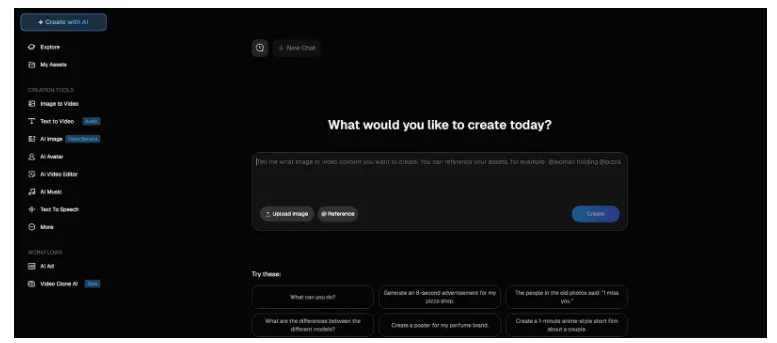
DeeVid AI is rolling out a major upgrade to its AI Video Agent—a workflow-first creation layer that helps you go from idea → assets → edit → publish with less manual back-and-forth. Instead of treating video generation as a single “prompt in, clip out” moment, DeeVid’s AI Video Agent is built to coordinate the steps creators actually need: planning scenes, keeping style consistent, generating variations, and finishing with audio that feels intentional.
If you’ve been using DeeVid as an AI Video generator, you’ll notice the update most in how you iterate. The goal isn’t just to generate a video—it’s to help you land a usable result faster, with fewer retries and cleaner output for real-world projects.
From one-shot prompting to guided production
A common pain point in video generation is that the “best prompt” often changes after you see the first output. The updated AI Video Agent is designed to work like a creative assistant that doesn’t lose context. You can:
- Start from a simple creative brief (product, mood, audience, length, format).
- Break the concept into scenes or beats (hook → demo → payoff, or storyboard-style).
- Generate multiple takes per scene with controlled variation.
- Keep a consistent visual direction across clips (so it doesn’t feel like a random montage).
- Move smoothly into finishing steps like voiceover and background music.
This structure matters because it reduces the trial-and-error loop. You spend less time retyping prompts and more time directing the result.
Stronger control for your AI Video generator outputs
The AI Video Agent update also focuses on controllability—the difference between “cool” and “usable.” While every generative model has limits, creators consistently ask for predictable results in three areas: subject consistency, style continuity, and pacing.
With the latest workflow improvements, you can more easily:
- Maintain the same character/product look across a sequence
- Match lighting and tone across scenes
- Produce multiple options quickly for A/B testing (especially useful for ads and social content)
- Build short-form content that feels edited, not stitched together
For marketing teams, this means faster creative testing. For creators, it means spending less time wrestling the tool and more time telling the story.
Audio becomes part of the workflow, not an afterthought
Great video is rarely silent—and “random stock music + robotic voice” can ruin an otherwise strong visual. That’s why this update puts sound directly inside the AI Video Agent workflow, connecting your visuals with Text to Speech and an AI Music generator in a way that supports consistent branding and mood.
Text to Speech that fits the scene
Instead of generating video first and scrambling for narration later, you can build voiceover into the plan:
- Generate voice lines per scene (hook, features, CTA, etc.)
- Adjust pacing so the voice naturally matches the edit rhythm
- Create multiple voice styles for different audiences (e.g., energetic for TikTok, calm for product explainers)
Using Text to Speech inside the same workflow helps you keep the message tight—and prevents the common problem where the visuals and narration feel like they were made by different teams.
AI Music generator for mood and momentum
Music isn’t just “background”—it’s emotional timing. With an integrated AI Music generator, you can:
- Create music that matches the intended vibe (clean tech, cozy lifestyle, cinematic reveal)
- Swap tracks quickly to test different moods
- Keep music consistent across a campaign series
For branded content, this is huge: you can shape a recognizable “sound” across multiple videos without spending days searching for the perfect track.
What this enables for teams and creators
The upgraded AI Video Agent isn’t only for “big productions.” It’s especially valuable for high-frequency content where speed and consistency matter:
- Performance marketing: generate multiple ad variants with different hooks, pacing, voiceovers, and music beds.
- E-commerce: create product demos, unbox-style clips, and feature highlights without a full shoot.
- Social content: keep a consistent style across a series, while still producing fresh variations.
- Education & explainers: pair clear visuals with structured narration using Text to Speech.
- Creators & studios: prototype story ideas quickly, then refine the best direction.
Getting started
If you’ve already used DeeVid, the new approach is simple: start with your outcome (what the viewer should feel or do), then let the AI Video Agent guide the steps—visual plan, generation, variations, and audio finishing. If you’re new, begin with one small goal (a 10–15 second clip, a product feature highlight, or a short narrated scene) and iterate from there.
The bigger idea: workflow is the product
Generative video tools are evolving fast, but the real advantage is no longer just model power—it’s workflow. DeeVid AI’s latest update is built around that belief: the best results come from a system that helps you plan, generate, refine, and finish in one place.
Whether you’re here for an AI Video generator, Text to Speech, or an AI Music generator, the updated AI Video Agent is designed to make all three work together—so your final output feels cohesive, intentional, and ready to publish.